Window: Location
[Created: 11/06/1999 - Updated: 02/01/2000 ]
Description: Maintain Location Address
Help: The Location Window defines the address data within the system. This window is for System Admin only. Users would access location entries using the location button or tab on the appropriate window (i.e Order Entry or Business Partner)
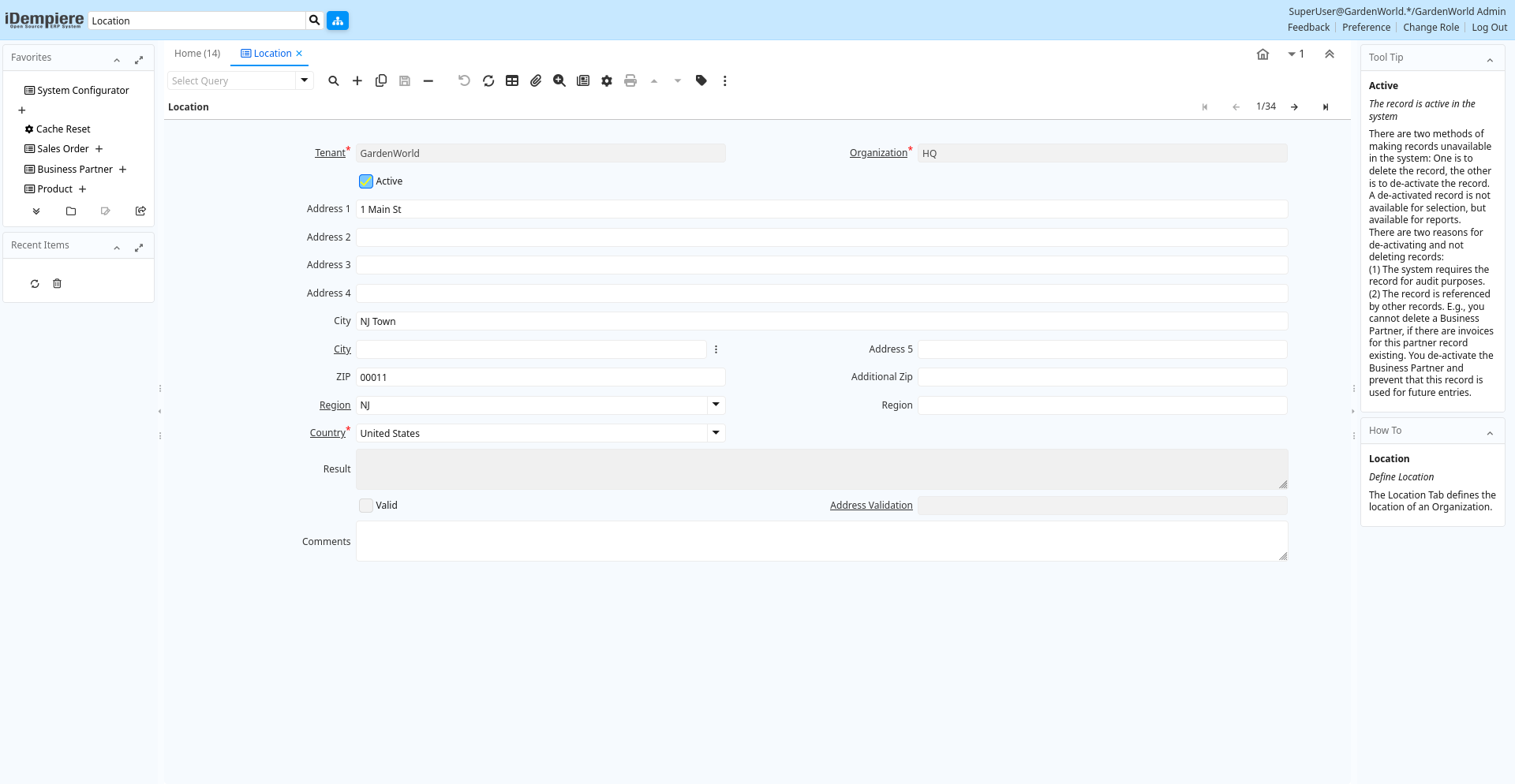
Tab: Location
[Created: 23/06/1999 - Updated: 02/01/2000 ]
Description: Define Location
Help: The Location Tab defines the location of an Organization.
Tab Level: 0
Table 10: Location - Fields
Table: Report Parameters
| Name | Description | Help | Technical Info |
|---|---|---|---|
| Tenant | Tenant for this installation. | A Tenant is a company or a legal entity. You cannot share data between Tenants. | c_location.AD_Client_ID numeric(10) Table Direct |
| Organization | Organizational entity within tenant | An organization is a unit of your tenant or legal entity - examples are store, department. You can share data between organizations. | c_location.AD_Org_ID numeric(10) Table Direct |
| Active | The record is active in the system | There are two methods of making records unavailable in the system: One is to delete the record, the other is to de-activate the record. A de-activated record is not available for selection, but available for reports.There are two reasons for de-activating and not deleting records:(1) The system requires the record for audit purposes.(2) The record is referenced by other records. E.g., you cannot delete a Business Partner, if there are invoices for this partner record existing. You de-activate the Business Partner and prevent that this record is used for future entries. | c_location.IsActive character(1) Yes-No |
| Address 1 | Address line 1 for this location | The Address 1 identifies the address for an entity's location | c_location.Address1 character varying(60) String |
| Address 2 | Address line 2 for this location | The Address 2 provides additional address information for an entity. It can be used for building location, apartment number or similar information. | c_location.Address2 character varying(60) String |
| Address 3 | Address Line 3 for the location | The Address 2 provides additional address information for an entity. It can be used for building location, apartment number or similar information. | c_location.Address3 character varying(60) String |
| Address 4 | Address Line 4 for the location | The Address 4 provides additional address information for an entity. It can be used for building location, apartment number or similar information. | c_location.Address4 character varying(60) String |
| City | Identifies a City | The City identifies a unique City for this Country or Region. | c_location.City character varying(60) String |
| City | City | City in a country | c_location.C_City_ID numeric(10) Search |
| Address 5 | Address Line 5 for the location | The Address 5 provides additional address information for an entity. It can be used for building location, apartment number or similar information. | c_location.Address5 character varying(60) String |
| ZIP | Postal code | The Postal Code or ZIP identifies the postal code for this entity's address. | c_location.Postal character varying(10) String |
| Additional Zip | Additional ZIP or Postal code | The Additional ZIP or Postal Code identifies, if appropriate, any additional Postal Code information. | c_location.Postal_Add character varying(10) String |
| Region | Identifies a geographical Region | The Region identifies a unique Region for this Country. | c_location.C_Region_ID numeric(10) Table Direct |
| Region | Name of the Region | The Region Name defines the name that will print when this region is used in a document. | c_location.RegionName character varying(40) String |
| Country | Country | The Country defines a Country. Each Country must be defined before it can be used in any document. | c_location.C_Country_ID numeric(10) Table Direct |
| Validate Address | c_location.ValidateAddress character(1) Button | ||
| Result | Result of the action taken | The Result indicates the result of any action taken on this request. | c_location.Result character varying(2000) Text |
| Valid | Element is valid | The element passed the validation check | c_location.IsValid character(1) Yes-No |
| Address Validation | c_location.C_AddressValidation_ID numeric(10) Table Direct | ||
| Comments | Comments or additional information | The Comments field allows for free form entry of additional information. | c_location.Comments character varying(2000) Text |