Window: Project (Lines/Issues)
[Created: 10/07/2003 - Updated: 15/01/2024 ]
Description: Maintain Sales Order and Work Order Details
Help: The Project Window is used to maintain details of Projects Lines and Issues across Phases/Tasks
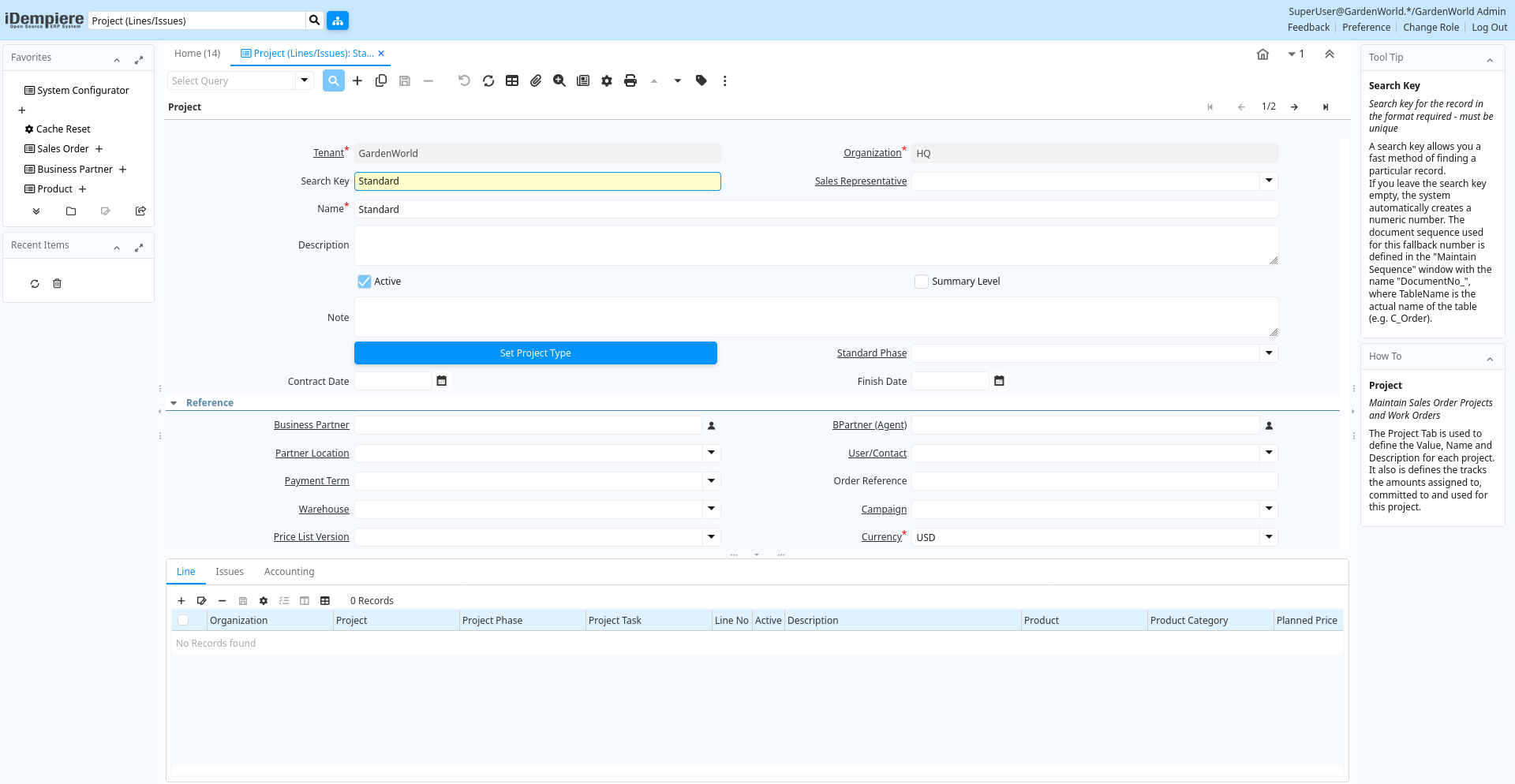
Tab: Project
[Created: 10/07/2003 - Updated: 26/03/2006 ]
Description: Maintain Sales Order Projects and Work Orders
Help: The Project Tab is used to define the Value, Name and Description for each project. It also is defines the tracks the amounts assigned to, committed to and used for this project.
Tab Level: 0
Table 10: Project - Fields
Table: Report Parameters
| Name | Description | Help | Technical Info |
|---|---|---|---|
| Tenant | Tenant for this installation. | A Tenant is a company or a legal entity. You cannot share data between Tenants. | c_project.AD_Client_ID numeric(10) Table Direct |
| Organization | Organizational entity within tenant | An organization is a unit of your tenant or legal entity - examples are store, department. You can share data between organizations. | c_project.AD_Org_ID numeric(10) Table Direct |
| Search Key | Search key for the record in the format required - must be unique | A search key allows you a fast method of finding a particular record.If you leave the search key empty, the system automatically creates a numeric number. The document sequence used for this fallback number is defined in the "Maintain Sequence" window with the name "DocumentNo_", where TableName is the actual name of the table (e.g. C_Order). | c_project.Value character varying(40) String |
| Sales Representative | Sales Representative or Company Agent | The Sales Representative indicates the Sales Rep for this Region. Any Sales Rep must be a valid internal user. | c_project.SalesRep_ID numeric(10) Table |
| Name | Alphanumeric identifier of the entity | The name of an entity (record) is used as an default search option in addition to the search key. The name is up to 60 characters in length. | c_project.Name character varying(60) String |
| Description | Optional short description of the record | A description is limited to 255 characters. | c_project.Description character varying(255) Text |
| Active | The record is active in the system | There are two methods of making records unavailable in the system: One is to delete the record, the other is to de-activate the record. A de-activated record is not available for selection, but available for reports.There are two reasons for de-activating and not deleting records:(1) The system requires the record for audit purposes.(2) The record is referenced by other records. E.g., you cannot delete a Business Partner, if there are invoices for this partner record existing. You de-activate the Business Partner and prevent that this record is used for future entries. | c_project.IsActive character(1) Yes-No |
| Summary Level | This is a summary entity | A summary entity represents a branch in a tree rather than an end-node. Summary entities are used for reporting and do not have own values. | c_project.IsSummary character(1) Yes-No |
| Note | Optional additional user defined information | The Note field allows for optional entry of user defined information regarding this record | c_project.Note character varying(2000) Text |
| Set Project Type | Set Project Type and for Service Projects copy Phases and Tasks of Project Type into Project | c_project.C_ProjectType_ID numeric(10) Button | |
| Standard Phase | Standard Phase of the Project Type | Phase of the project with standard performance information with standard work | c_project.C_Phase_ID numeric(10) Table Direct |
| Contract Date | The (planned) effective date of this document. | The contract date is used to determine when the document becomes effective. This is usually the contract date. The contract date is used in reports and report parameters. | c_project.DateContract timestamp without time zone Date |
| Finish Date | Finish or (planned) completion date | The finish date is used to indicate when the project is expected to be completed or has been completed. | c_project.DateFinish timestamp without time zone Date |
| Business Partner | Identifies a Business Partner | A Business Partner is anyone with whom you transact. This can include Vendor, Customer, Employee or Salesperson | c_project.C_BPartner_ID numeric(10) Search |
| BPartner (Agent) | Business Partner (Agent or Sales Rep) | c_project.C_BPartnerSR_ID numeric(10) Search | |
| Partner Location | Identifies the (ship to) address for this Business Partner | The Partner address indicates the location of a Business Partner | c_project.C_BPartner_Location_ID numeric(10) Table Direct |
| User/Contact | User within the system - Internal or Business Partner Contact | The User identifies a unique user in the system. This could be an internal user or a business partner contact | c_project.AD_User_ID numeric(10) Table Direct |
| Payment Term | The terms of Payment (timing, discount) | Payment Terms identify the method and timing of payment. | c_project.C_PaymentTerm_ID numeric(10) Table Direct |
| Order Reference | Transaction Reference Number (Sales Order, Purchase Order) of your Business Partner | The business partner order reference is the order reference for this specific transaction; Often Purchase Order numbers are given to print on Invoices for easier reference. A standard number can be defined in the Business Partner (Customer) window. | c_project.POReference character varying(20) String |
| Warehouse | Storage Warehouse and Service Point | The Warehouse identifies a unique Warehouse where products are stored or Services are provided. | c_project.M_Warehouse_ID numeric(10) Table Direct |
| Campaign | Marketing Campaign | The Campaign defines a unique marketing program. Projects can be associated with a pre defined Marketing Campaign. You can then report based on a specific Campaign. | c_project.C_Campaign_ID numeric(10) Table Direct |
| Price List Version | Identifies a unique instance of a Price List | Each Price List can have multiple versions. The most common use is to indicate the dates that a Price List is valid for. | c_project.M_PriceList_Version_ID numeric(10) Table Direct |
| Currency | The Currency for this record | Indicates the Currency to be used when processing or reporting on this record | c_project.C_Currency_ID numeric(10) Table Direct |
| Planned Amount | Planned amount for this project | The Planned Amount indicates the anticipated amount for this project or project line. | c_project.PlannedAmt numeric Amount |
| Planned Quantity | Planned quantity for this project | The Planned Quantity indicates the anticipated quantity for this project or project line | c_project.PlannedQty numeric Quantity |
| Planned Margin | Project's planned margin amount | The Planned Margin Amount indicates the anticipated margin amount for this project or project line. | c_project.PlannedMarginAmt numeric Amount |
| Invoice Rule | Invoice Rule for the project | The Invoice Rule for the project determines how orders (and consequently invoices) are created. The selection on project level can be overwritten on Phase or Task | c_project.ProjInvoiceRule character(1) List |
| Committed Amount | The (legal) commitment amount | The commitment amount is independent from the planned amount. You would use the planned amount for your realistic estimation, which might be higher or lower than the commitment amount. | c_project.CommittedAmt numeric Amount |
| Committed Quantity | The (legal) commitment Quantity | The commitment amount is independent from the planned amount. You would use the planned amount for your realistic estimation, which might be higher or lower than the commitment amount. | c_project.CommittedQty numeric Quantity |
| Invoiced Amount | The amount invoiced | The amount invoiced | c_project.InvoicedAmt numeric Amount |
| Quantity Invoiced | The quantity invoiced | c_project.InvoicedQty numeric Quantity | |
| Project Balance | Total Project Balance | The project balance is the sum of all invoices and payments | c_project.ProjectBalanceAmt numeric Amount |
| Copy Details | Copy Lines/Phases/Tasks from other Project | c_project.CopyFrom character(1) Button | |
| Generate Order | Generate Order from Project | The Generate Order process will generate a new Order document based on the project phase. A price list and warehouse/service point must be defined on the project. | c_project.GenerateTo character(1) Button |
| Close Project | c_project.Processing character(1) Button |
Tab: Line
[Created: 11/03/2001 - Updated: 02/09/2005 ]
Description: Define Project Lines
Help: The Project Lines Tab is used to define the lines (products and/or services) associated with this Project. This is an alternative to Project Phases. You would use lines, if you do not want to use a Project Type template with phases.
Tab Level: 1
Table 20: Line - Fields
Table: Report Parameters
| Name | Description | Help | Technical Info |
|---|---|---|---|
| Tenant | Tenant for this installation. | A Tenant is a company or a legal entity. You cannot share data between Tenants. | c_projectline.AD_Client_ID numeric(10) Table Direct |
| Organization | Organizational entity within tenant | An organization is a unit of your tenant or legal entity - examples are store, department. You can share data between organizations. | c_projectline.AD_Org_ID numeric(10) Table Direct |
| Project | Financial Project | A Project allows you to track and control internal or external activities. | c_projectline.C_Project_ID numeric(10) Table Direct |
| Project Phase | Phase of a Project | c_projectline.C_ProjectPhase_ID numeric(10) Table Direct | |
| Project Task | Actual Project Task in a Phase | A Project Task in a Project Phase represents the actual work. | c_projectline.C_ProjectTask_ID numeric(10) Table Direct |
| Line No | Unique line for this document | Indicates the unique line for a document. It will also control the display order of the lines within a document. | c_projectline.Line numeric(10) Integer |
| Active | The record is active in the system | There are two methods of making records unavailable in the system: One is to delete the record, the other is to de-activate the record. A de-activated record is not available for selection, but available for reports.There are two reasons for de-activating and not deleting records:(1) The system requires the record for audit purposes.(2) The record is referenced by other records. E.g., you cannot delete a Business Partner, if there are invoices for this partner record existing. You de-activate the Business Partner and prevent that this record is used for future entries. | c_projectline.IsActive character(1) Yes-No |
| Description | Optional short description of the record | A description is limited to 255 characters. | c_projectline.Description character varying(255) Text |
| Product | Product, Service, Item | Identifies an item which is either purchased or sold in this organization. | c_projectline.M_Product_ID numeric(10) Search |
| Product Category | Category of a Product | Identifies the category which this product belongs to. Product categories are used for pricing and selection. | c_projectline.M_Product_Category_ID numeric(10) Table Direct |
| Planned Price | Planned price for this project line | The Planned Price indicates the anticipated price for this project line. | c_projectline.PlannedPrice numeric Costs+Prices |
| Planned Quantity | Planned quantity for this project | The Planned Quantity indicates the anticipated quantity for this project or project line | c_projectline.PlannedQty numeric Quantity |
| Get Price | Get Price for Project Line based on Project Price List | c_projectline.DoPricing character(1) Button | |
| Planned Amount | Planned amount for this project | The Planned Amount indicates the anticipated amount for this project or project line. | c_projectline.PlannedAmt numeric Amount |
| Printed | Indicates if this document / line is printed | The Printed checkbox indicates if this document or line will included when printing. | c_projectline.IsPrinted character(1) Yes-No |
| Planned Margin | Project's planned margin amount | The Planned Margin Amount indicates the anticipated margin amount for this project or project line. | c_projectline.PlannedMarginAmt numeric Amount |
| Committed Amount | The (legal) commitment amount | The commitment amount is independent from the planned amount. You would use the planned amount for your realistic estimation, which might be higher or lower than the commitment amount. | c_projectline.CommittedAmt numeric Amount |
| Committed Quantity | The (legal) commitment Quantity | The commitment amount is independent from the planned amount. You would use the planned amount for your realistic estimation, which might be higher or lower than the commitment amount. | c_projectline.CommittedQty numeric Quantity |
| Invoiced Amount | The amount invoiced | The amount invoiced | c_projectline.InvoicedAmt numeric Amount |
| Quantity Invoiced | The quantity invoiced | c_projectline.InvoicedQty numeric Quantity | |
| Order | Order | The Order is a control document. The Order is complete when the quantity ordered is the same as the quantity shipped and invoiced. When you close an order, unshipped (backordered) quantities are cancelled. | c_projectline.C_Order_ID numeric(10) Search |
| Purchase Order | Purchase Order | c_projectline.C_OrderPO_ID numeric(10) Search | |
| Project Issue | Project Issues (Material, Labor) | Issues to the project initiated by the "Issue to Project" process. You can issue Receipts, Time and Expenses, or Stock. | c_projectline.C_ProjectIssue_ID numeric(10) Table Direct |
| Processed | The document has been processed | The Processed checkbox indicates that a document has been processed. | c_projectline.Processed character(1) Yes-No |
Tab: Issues
[Created: 02/09/2003 - Updated: 17/08/2021 ]
Description: Issues to the Project
Help: The lab lists the Issues to the project initiated by the "Issue to Project" process. You can issue Receipts, Time and Expenses, or Stock.
Tab Level: 1
Table 30: Issues - Fields
Table: Report Parameters
| Name | Description | Help | Technical Info |
|---|---|---|---|
| Tenant | Tenant for this installation. | A Tenant is a company or a legal entity. You cannot share data between Tenants. | c_projectissue.AD_Client_ID numeric(10) Table Direct |
| Organization | Organizational entity within tenant | An organization is a unit of your tenant or legal entity - examples are store, department. You can share data between organizations. | c_projectissue.AD_Org_ID numeric(10) Table Direct |
| Project | Financial Project | A Project allows you to track and control internal or external activities. | c_projectissue.C_Project_ID numeric(10) Table Direct |
| Active | The record is active in the system | There are two methods of making records unavailable in the system: One is to delete the record, the other is to de-activate the record. A de-activated record is not available for selection, but available for reports.There are two reasons for de-activating and not deleting records:(1) The system requires the record for audit purposes.(2) The record is referenced by other records. E.g., you cannot delete a Business Partner, if there are invoices for this partner record existing. You de-activate the Business Partner and prevent that this record is used for future entries. | c_projectissue.IsActive character(1) Yes-No |
| Line No | Unique line for this document | Indicates the unique line for a document. It will also control the display order of the lines within a document. | c_projectissue.Line numeric(10) Integer |
| Movement Date | Date a product was moved in or out of inventory | The Movement Date indicates the date that a product moved in or out of inventory. This is the result of a shipment, receipt or inventory movement. | c_projectissue.MovementDate timestamp without time zone Date |
| Product | Product, Service, Item | Identifies an item which is either purchased or sold in this organization. | c_projectissue.M_Product_ID numeric(10) Search |
| Attribute Set Instance | Product Attribute Set Instance | The values of the actual Product Attribute Instances. The product level attributes are defined on Product level. | c_projectissue.M_AttributeSetInstance_ID numeric(10) Product Attribute |
| Locator | Warehouse Locator | The Locator indicates where in a Warehouse a product is located. | c_projectissue.M_Locator_ID numeric(10) Locator (WH) |
| Movement Quantity | Quantity of a product moved. | The Movement Quantity indicates the quantity of a product that has been moved. | c_projectissue.MovementQty numeric Quantity |
| Description | Optional short description of the record | A description is limited to 255 characters. | c_projectissue.Description character varying(255) Text |
| Shipment/Receipt Line | Line on Shipment or Receipt document | The Shipment/Receipt Line indicates a unique line in a Shipment/Receipt document | c_projectissue.M_InOutLine_ID numeric(10) Search |
| Expense Line | Time and Expense Report Line | c_projectissue.S_TimeExpenseLine_ID numeric(10) Search | |
| Document Status | The current status of the document | The Document Status indicates the status of a document at this time. If you want to change the document status, use the Document Action field | c_projectissue.DocStatus character varying(2) List |
| Process Project Issue | c_projectissue.DocAction character(2) Button | ||
| Processed | The document has been processed | The Processed checkbox indicates that a document has been processed. | c_projectissue.Processed character(1) Yes-No |
| Posted | Posting status | The Posted field indicates the status of the Generation of General Ledger Accounting Lines | c_projectissue.Posted character(1) Button |
Tab: Accounting
[Created: 10/07/2003 - Updated: 26/03/2006 ]
Description: Define Project Accounting
Help: The Accounting Tab is used to define the Asset Account to use when a project is completed and the associated asset realized.
Tab Level: 1
Table 40: Accounting - Fields
Table: Report Parameters
| Name | Description | Help | Technical Info |
|---|---|---|---|
| Tenant | Tenant for this installation. | A Tenant is a company or a legal entity. You cannot share data between Tenants. | c_project_acct.AD_Client_ID numeric(10) Table Direct |
| Organization | Organizational entity within tenant | An organization is a unit of your tenant or legal entity - examples are store, department. You can share data between organizations. | c_project_acct.AD_Org_ID numeric(10) Table Direct |
| Project | Financial Project | A Project allows you to track and control internal or external activities. | c_project_acct.C_Project_ID numeric(10) Table Direct |
| Accounting Schema | Rules for accounting | An Accounting Schema defines the rules used in accounting such as costing method, currency and calendar | c_project_acct.C_AcctSchema_ID numeric(10) Table Direct |
| Active | The record is active in the system | There are two methods of making records unavailable in the system: One is to delete the record, the other is to de-activate the record. A de-activated record is not available for selection, but available for reports.There are two reasons for de-activating and not deleting records:(1) The system requires the record for audit purposes.(2) The record is referenced by other records. E.g., you cannot delete a Business Partner, if there are invoices for this partner record existing. You de-activate the Business Partner and prevent that this record is used for future entries. | c_project_acct.IsActive character(1) Yes-No |
| Project Asset | Project Asset Account | The Project Asset account is the account used as the final asset account in capital projects | c_project_acct.PJ_Asset_Acct numeric(10) Account |
| Work In Progress | Account for Work in Progress | The Work in Process account is the account used in capital projects until the project is completed | c_project_acct.PJ_WIP_Acct numeric(10) Account |