Window: POS Terminal
[Created: 09/07/2004 - Updated: 17/02/2022 ]
Description: Maintain your Point of Sales Terminal
Help: The POS Terminal defines the defaults and functions available for the POS Form
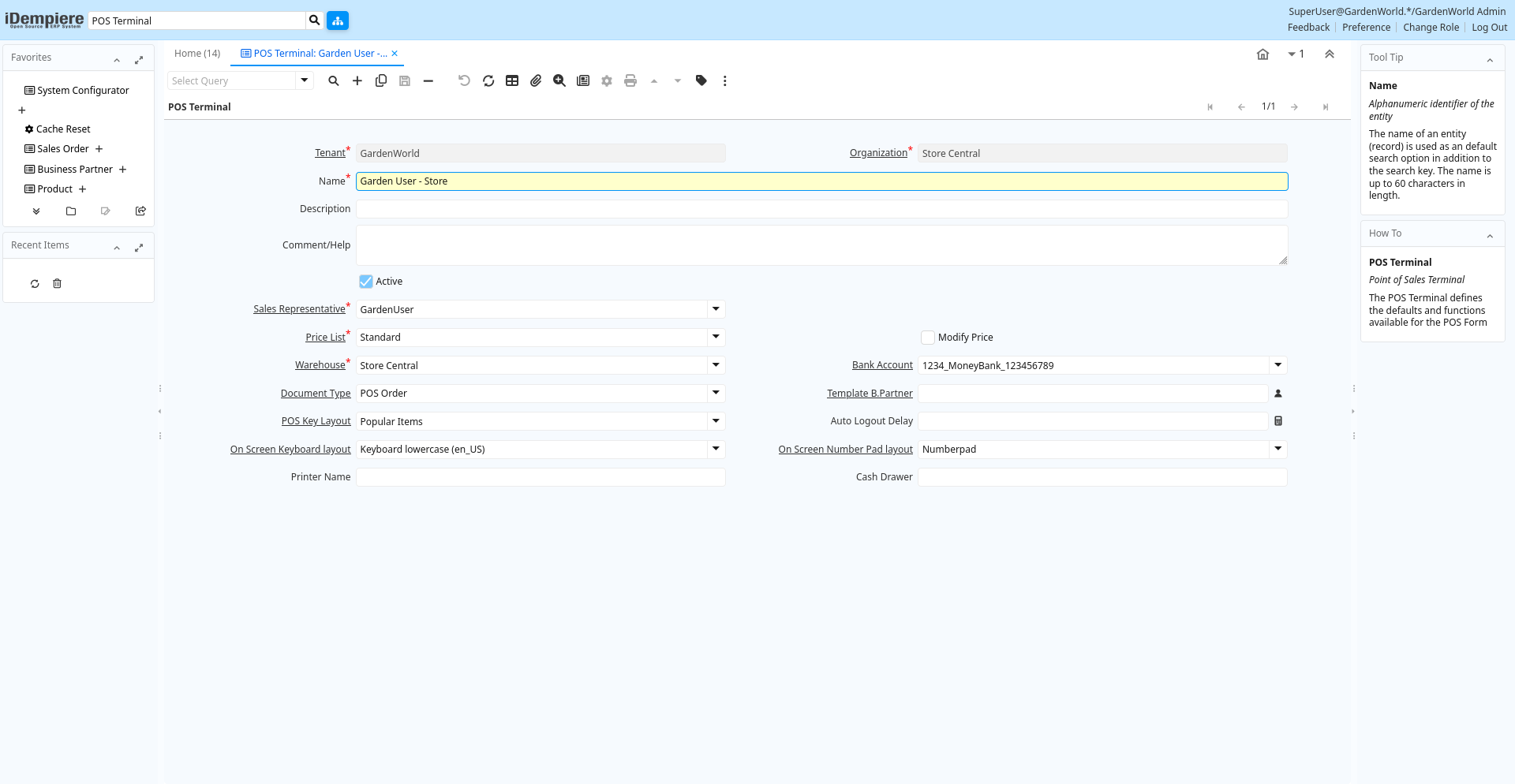
Tab: POS Terminal
[Created: 09/07/2004 - Updated: 02/01/2000 ]
Description: Point of Sales Terminal
Help: The POS Terminal defines the defaults and functions available for the POS Form
Tab Level: 0
Table 10: POS Terminal - Fields
Table: Report Parameters
| Name | Description | Help | Technical Info |
|---|---|---|---|
| Tenant | Tenant for this installation. | A Tenant is a company or a legal entity. You cannot share data between Tenants. | c_pos.AD_Client_ID numeric(10) Table Direct |
| Organization | Organizational entity within tenant | An organization is a unit of your tenant or legal entity - examples are store, department. You can share data between organizations. | c_pos.AD_Org_ID numeric(10) Table Direct |
| Name | Alphanumeric identifier of the entity | The name of an entity (record) is used as an default search option in addition to the search key. The name is up to 60 characters in length. | c_pos.Name character varying(60) String |
| Description | Optional short description of the record | A description is limited to 255 characters. | c_pos.Description character varying(255) String |
| Comment/Help | Comment or Hint | The Help field contains a hint, comment or help about the use of this item. | c_pos.Help character varying(2000) Text |
| Active | The record is active in the system | There are two methods of making records unavailable in the system: One is to delete the record, the other is to de-activate the record. A de-activated record is not available for selection, but available for reports.There are two reasons for de-activating and not deleting records:(1) The system requires the record for audit purposes.(2) The record is referenced by other records. E.g., you cannot delete a Business Partner, if there are invoices for this partner record existing. You de-activate the Business Partner and prevent that this record is used for future entries. | c_pos.IsActive character(1) Yes-No |
| Sales Representative | Sales Representative or Company Agent | The Sales Representative indicates the Sales Rep for this Region. Any Sales Rep must be a valid internal user. | c_pos.SalesRep_ID numeric(10) Table |
| Price List | Unique identifier of a Price List | Price Lists are used to determine the pricing, margin and cost of items purchased or sold. | c_pos.M_PriceList_ID numeric(10) Table Direct |
| Modify Price | Allow modifying the price | Allow modifying the price for products with a non zero price | c_pos.IsModifyPrice character(1) Yes-No |
| Warehouse | Storage Warehouse and Service Point | The Warehouse identifies a unique Warehouse where products are stored or Services are provided. | c_pos.M_Warehouse_ID numeric(10) Table Direct |
| Bank Account | Account at the Bank | The Bank Account identifies an account at this Bank. | c_pos.C_BankAccount_ID numeric(10) Table Direct |
| Document Type | Document type or rules | The Document Type determines document sequence and processing rules | c_pos.C_DocType_ID numeric(10) Table Direct |
| Template B.Partner | Business Partner used for creating new Business Partners on the fly | When creating a new Business Partner from the Business Partner Search Field (right-click: Create), the selected business partner is used as a template, e.g. to define price list, payment terms, etc. | c_pos.C_BPartnerCashTrx_ID numeric(10) Search |
| POS Key Layout | POS Function Key Layout | POS Function Key Layout | c_pos.C_POSKeyLayout_ID numeric(10) Table Direct |
| Auto Logout Delay | Automatically logout if terminal inactive for this period | Measured in seconds, zero for no automatic logout | c_pos.AutoLogoutDelay numeric(10) Integer |
| On Screen Keyboard layout | The key layout to use for on screen keyboard for text fields. | If empty, the on screen keyboard will not be used. | c_pos.OSK_KeyLayout_ID numeric(10) Table |
| On Screen Number Pad layout | The key layout to use for on screen number pad for numeric fields. | If empty, the on screen numberpad will not be used. | c_pos.OSNP_KeyLayout_ID numeric(10) Table |
| Printer Name | Name of the Printer | Internal (Operating System) Name of the Printer; Please mote that the printer name may be different on different tenants. Enter a printer name, which applies to ALL tenants (e.g. printer on a server). If none is entered, the default printer is used. You specify your default printer when you log in. You can also change the default printer in Preferences. | c_pos.PrinterName character varying(60) String |
| Cash Drawer | c_pos.CashDrawer character varying(120) String |