Window: Payment Selection
[Created: 15/02/2001 - Updated: 03/06/2021 ]
Description: Select Invoices for Payment
Help: The Payment Selection Window allows you to select and process the invoices you want to pay.(a) You can create a Payment Selection and select the invoices manually or generate the suggestions based on criteria. You can change the amount to be paid or delete invoices, you do not want to pay.(b) If you are happy with the Payment Selection, you create the payments.(c) You print or export your payments in the Window Payment Print/Export
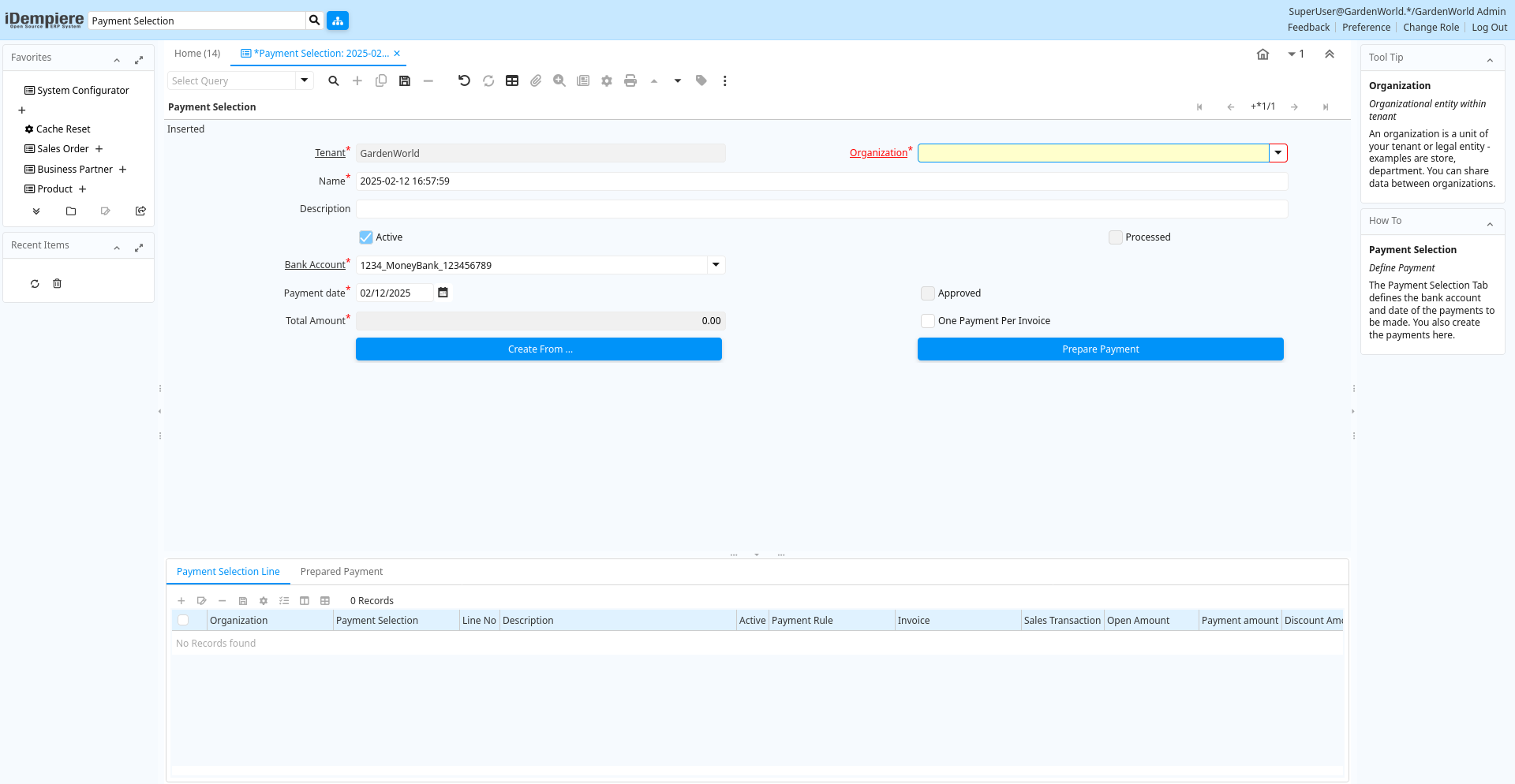
Tab: Payment Selection
[Created: 15/02/2001 - Updated: 02/01/2000 ]
Description: Define Payment
Help: The Payment Selection Tab defines the bank account and date of the payments to be made. You also create the payments here.
Tab Level: 0
Table 10: Payment Selection - Fields
Table: Report Parameters
| Name | Description | Help | Technical Info |
|---|---|---|---|
| Tenant | Tenant for this installation. | A Tenant is a company or a legal entity. You cannot share data between Tenants. | c_payselection.AD_Client_ID numeric(10) Table Direct |
| Organization | Organizational entity within tenant | An organization is a unit of your tenant or legal entity - examples are store, department. You can share data between organizations. | c_payselection.AD_Org_ID numeric(10) Table Direct |
| Name | Alphanumeric identifier of the entity | The name of an entity (record) is used as an default search option in addition to the search key. The name is up to 60 characters in length. | c_payselection.Name character varying(120) String |
| Description | Optional short description of the record | A description is limited to 255 characters. | c_payselection.Description character varying(255) String |
| Active | The record is active in the system | There are two methods of making records unavailable in the system: One is to delete the record, the other is to de-activate the record. A de-activated record is not available for selection, but available for reports.There are two reasons for de-activating and not deleting records:(1) The system requires the record for audit purposes.(2) The record is referenced by other records. E.g., you cannot delete a Business Partner, if there are invoices for this partner record existing. You de-activate the Business Partner and prevent that this record is used for future entries. | c_payselection.IsActive character(1) Yes-No |
| Processed | The document has been processed | The Processed checkbox indicates that a document has been processed. | c_payselection.Processed character(1) Yes-No |
| Bank Account | Account at the Bank | The Bank Account identifies an account at this Bank. | c_payselection.C_BankAccount_ID numeric(10) Table Direct |
| Payment date | Date Payment made | The Payment Date indicates the date the payment was made. | c_payselection.PayDate timestamp without time zone Date |
| Approved | Indicates if this document requires approval | The Approved checkbox indicates if this document requires approval before it can be processed. | c_payselection.IsApproved character(1) Yes-No |
| Total Amount | Total Amount | The Total Amount indicates the total document amount. | c_payselection.TotalAmt numeric Amount |
| One Payment Per Invoice | c_payselection.IsOnePaymentPerInvoice character(1) Yes-No | ||
| Create From ... | c_payselection.CreateFrom character(1) Button | ||
| Prepare Payment | Create Prepared Payments (Checks) to be paid | You create the actual Payments via Payment Print/Export | c_payselection.Processing character(1) Button |
| Reverse Prepare Payment | Reverse what Prepare Payment process did | Delete prepared payments and allow to add/remove invoices | c_payselection.ReversePreparePayment character(1) Button |
Tab: Payment Selection Line
[Created: 15/02/2001 - Updated: 16/03/2021 ]
Description: Payment Selection Line
Help: The Payment Selection Line Tab defines the individual invoices an organization is paying to a Vendor with this payment.
Tab Level: 1
Table 20: Payment Selection Line - Fields
Table: Report Parameters
| Name | Description | Help | Technical Info |
|---|---|---|---|
| Tenant | Tenant for this installation. | A Tenant is a company or a legal entity. You cannot share data between Tenants. | c_payselectionline.AD_Client_ID numeric(10) Table Direct |
| Organization | Organizational entity within tenant | An organization is a unit of your tenant or legal entity - examples are store, department. You can share data between organizations. | c_payselectionline.AD_Org_ID numeric(10) Table Direct |
| Payment Selection | Payment Selection | The Payment Selection identifies a unique Payment | c_payselectionline.C_PaySelection_ID numeric(10) Search |
| Line No | Unique line for this document | Indicates the unique line for a document. It will also control the display order of the lines within a document. | c_payselectionline.Line numeric(10) Integer |
| Description | Optional short description of the record | A description is limited to 255 characters. | c_payselectionline.Description character varying(255) String |
| Active | The record is active in the system | There are two methods of making records unavailable in the system: One is to delete the record, the other is to de-activate the record. A de-activated record is not available for selection, but available for reports.There are two reasons for de-activating and not deleting records:(1) The system requires the record for audit purposes.(2) The record is referenced by other records. E.g., you cannot delete a Business Partner, if there are invoices for this partner record existing. You de-activate the Business Partner and prevent that this record is used for future entries. | c_payselectionline.IsActive character(1) Yes-No |
| Payment Rule | How you pay the invoice | The Payment Rule indicates the method of invoice payment. | c_payselectionline.PaymentRule character(1) List |
| Invoice | Invoice Identifier | The Invoice Document. | c_payselectionline.C_Invoice_ID numeric(10) Search |
| Sales Transaction | This is a Sales Transaction | The Sales Transaction checkbox indicates if this item is a Sales Transaction. | c_payselectionline.IsSOTrx character(1) Yes-No |
| Open Amount | Open item amount | c_payselectionline.OpenAmt numeric Amount | |
| Payment amount | Amount being paid | Indicates the amount this payment is for. The payment amount can be for single or multiple invoices or a partial payment for an invoice. | c_payselectionline.PayAmt numeric Amount |
| Write-off Amount | Amount to write-off | The Write Off Amount indicates the amount to be written off as uncollectible. | c_payselectionline.WriteOffAmt numeric Amount |
| Discount Amount | Calculated amount of discount | The Discount Amount indicates the discount amount for a document or line. | c_payselectionline.DiscountAmt numeric Amount |
| Difference | Difference Amount | c_payselectionline.DifferenceAmt numeric Amount | |
| Pay Selection Check | Payment Selection Check | c_payselectionline.C_PaySelectionCheck_ID numeric(10) Search | |
| Processed | The document has been processed | The Processed checkbox indicates that a document has been processed. | c_payselectionline.Processed character(1) Yes-No |
Tab: Prepared Payment
[Created: 07/09/2002 - Updated: 02/01/2000 ]
Description: View Generated Prepared Payments (Checks)
Help: You create the actual Payments via Payment Print/Export
Tab Level: 1
Table 30: Prepared Payment - Fields
Table: Report Parameters
| Name | Description | Help | Technical Info |
|---|---|---|---|
| Tenant | Tenant for this installation. | A Tenant is a company or a legal entity. You cannot share data between Tenants. | c_payselectioncheck.AD_Client_ID numeric(10) Table Direct |
| Organization | Organizational entity within tenant | An organization is a unit of your tenant or legal entity - examples are store, department. You can share data between organizations. | c_payselectioncheck.AD_Org_ID numeric(10) Table Direct |
| Payment Selection | Payment Selection | The Payment Selection identifies a unique Payment | c_payselectioncheck.C_PaySelection_ID numeric(10) Search |
| Business Partner | Identifies a Business Partner | A Business Partner is anyone with whom you transact. This can include Vendor, Customer, Employee or Salesperson | c_payselectioncheck.C_BPartner_ID numeric(10) Search |
| Payment Rule | How you pay the invoice | The Payment Rule indicates the method of invoice payment. | c_payselectioncheck.PaymentRule character(1) List |
| Quantity | Quantity | The Quantity indicates the number of a specific product or item for this document. | c_payselectioncheck.Qty numeric Integer |
| Payment amount | Amount being paid | Indicates the amount this payment is for. The payment amount can be for single or multiple invoices or a partial payment for an invoice. | c_payselectioncheck.PayAmt numeric Amount |
| Discount Amount | Calculated amount of discount | The Discount Amount indicates the discount amount for a document or line. | c_payselectioncheck.DiscountAmt numeric Amount |
| Write-off Amount | Amount to write-off | The Write Off Amount indicates the amount to be written off as uncollectible. | c_payselectioncheck.WriteOffAmt numeric Amount |
| Document No | Document sequence number of the document | The document number is usually automatically generated by the system and determined by the document type of the document. If the document is not saved, the preliminary number is displayed in "".If the document type of your document has no automatic document sequence defined, the field is empty if you create a new document. This is for documents which usually have an external number (like vendor invoice). If you leave the field empty, the system will generate a document number for you. The document sequence used for this fallback number is defined in the "Maintain Sequence" window with the name "DocumentNo_", where TableName is the actual name of the table (e.g. C_Order). | c_payselectioncheck.DocumentNo character varying(30) String |
| Receipt | This is a sales transaction (receipt) | c_payselectioncheck.IsReceipt character(1) Yes-No | |
| Payment | Payment identifier | The Payment is a unique identifier of this payment. | c_payselectioncheck.C_Payment_ID numeric(10) Search |
| Printed | Indicates if this document / line is printed | The Printed checkbox indicates if this document or line will included when printing. | c_payselectioncheck.IsPrinted character(1) Yes-No |
| Processed | The document has been processed | The Processed checkbox indicates that a document has been processed. | c_payselectioncheck.Processed character(1) Yes-No |