Window: Resource Type
[Created: 15/06/2002 - Updated: 17/12/2007 ]
Description: Maintain Resource Types
Help: Maintain Resource types and their principal availability. it is used to calculate the available time in a resource. It allows input of starting time and end time for the slot according to the working days.
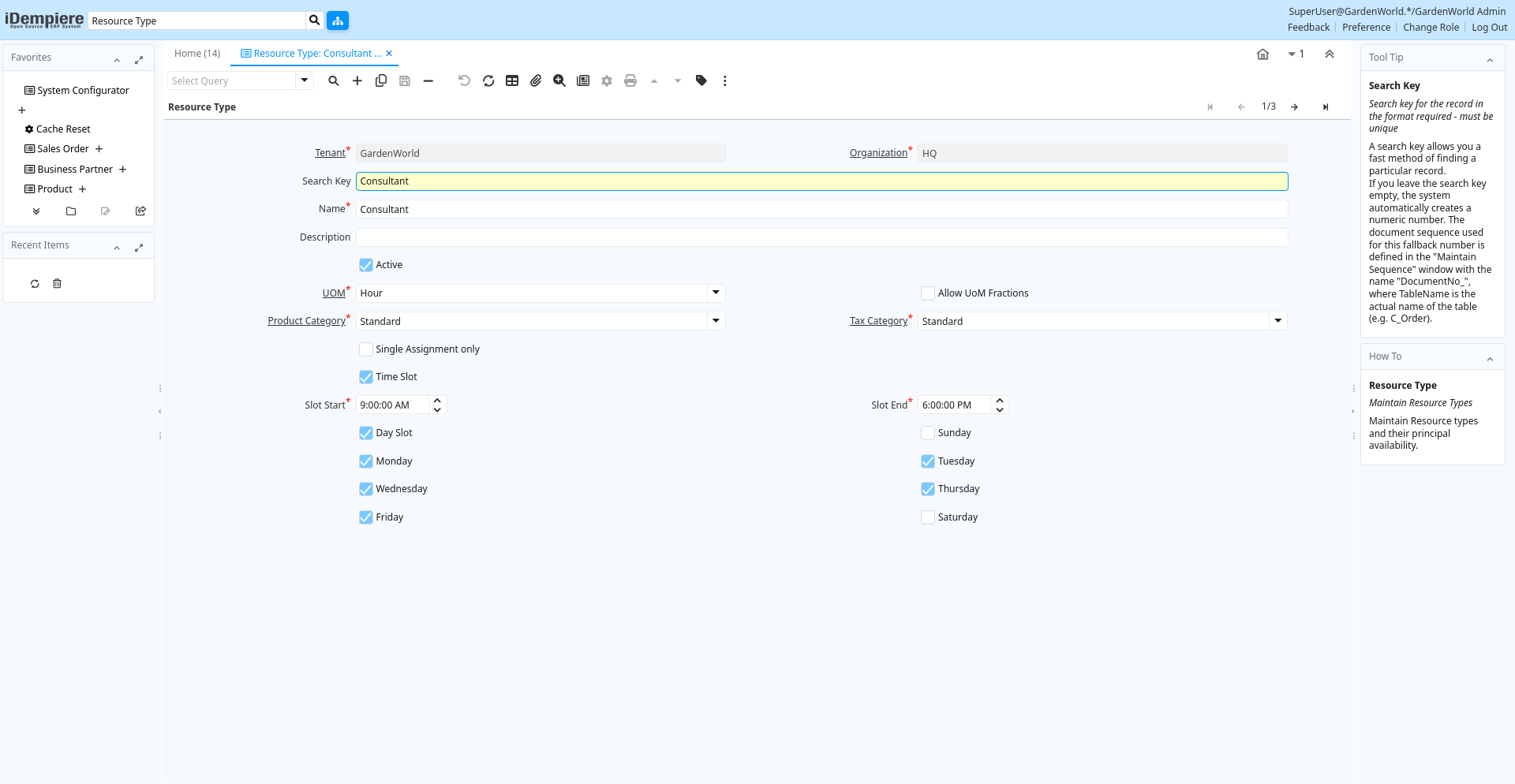
Tab: Resource Type
[Created: 15/06/2002 - Updated: 17/12/2007 ]
Description: Maintain Resource Types
Help: Maintain Resource types and their principal availability.
Tab Level: 0
Table 10: Resource Type - Fields
Table: Report Parameters
| Name | Description | Help | Technical Info |
|---|---|---|---|
| Tenant | Tenant for this installation. | A Tenant is a company or a legal entity. You cannot share data between Tenants. | s_resourcetype.AD_Client_ID numeric(10) Table Direct |
| Organization | Organizational entity within tenant | An organization is a unit of your tenant or legal entity - examples are store, department. You can share data between organizations. | s_resourcetype.AD_Org_ID numeric(10) Table Direct |
| Search Key | Search key for the record in the format required - must be unique | A search key allows you a fast method of finding a particular record.If you leave the search key empty, the system automatically creates a numeric number. The document sequence used for this fallback number is defined in the "Maintain Sequence" window with the name "DocumentNo_", where TableName is the actual name of the table (e.g. C_Order). | s_resourcetype.Value character varying(40) String |
| Name | Alphanumeric identifier of the entity | The name of an entity (record) is used as an default search option in addition to the search key. The name is up to 60 characters in length. | s_resourcetype.Name character varying(60) String |
| Description | Optional short description of the record | A description is limited to 255 characters. | s_resourcetype.Description character varying(255) String |
| Active | The record is active in the system | There are two methods of making records unavailable in the system: One is to delete the record, the other is to de-activate the record. A de-activated record is not available for selection, but available for reports.There are two reasons for de-activating and not deleting records:(1) The system requires the record for audit purposes.(2) The record is referenced by other records. E.g., you cannot delete a Business Partner, if there are invoices for this partner record existing. You de-activate the Business Partner and prevent that this record is used for future entries. | s_resourcetype.IsActive character(1) Yes-No |
| UOM | Unit of Measure | The UOM defines a unique non monetary Unit of Measure | s_resourcetype.C_UOM_ID numeric(10) Table Direct |
| Allow UoM Fractions | Allow Unit of Measure Fractions | If allowed, you can enter UoM Fractions | s_resourcetype.AllowUoMFractions character(1) Yes-No |
| Product Category | Category of a Product | Identifies the category which this product belongs to. Product categories are used for pricing and selection. | s_resourcetype.M_Product_Category_ID numeric(10) Table Direct |
| Tax Category | Tax Category | The Tax Category provides a method of grouping similar taxes. For example, Sales Tax or Value Added Tax. | s_resourcetype.C_TaxCategory_ID numeric(10) Table Direct |
| Single Assignment only | Only one assignment at a time (no double-booking or overlapping) | If selected, you can only have one assignment for the resource at a single point in time. It is also not possible to have overlapping assignments. | s_resourcetype.IsSingleAssignment character(1) Yes-No |
| Time Slot | Resource has time slot availability | Resource is only available at certain times | s_resourcetype.IsTimeSlot character(1) Yes-No |
| Slot Start | Time when timeslot starts | Starting time for time slots | s_resourcetype.TimeSlotStart timestamp without time zone Time |
| Slot End | Time when timeslot ends | Ending time for time slots | s_resourcetype.TimeSlotEnd timestamp without time zone Time |
| Day Slot | Resource has day slot availability | Resource is only available on certain days | s_resourcetype.IsDateSlot character(1) Yes-No |
| Sunday | Available on Sundays | s_resourcetype.OnSunday character(1) Yes-No | |
| Monday | Available on Mondays | s_resourcetype.OnMonday character(1) Yes-No | |
| Tuesday | Available on Tuesdays | s_resourcetype.OnTuesday character(1) Yes-No | |
| Wednesday | Available on Wednesdays | s_resourcetype.OnWednesday character(1) Yes-No | |
| Thursday | Available on Thursdays | s_resourcetype.OnThursday character(1) Yes-No | |
| Friday | Available on Fridays | s_resourcetype.OnFriday character(1) Yes-No | |
| Saturday | Available on Saturday | s_resourcetype.OnSaturday character(1) Yes-No |