Window: Report Column Set
[Created: 13/05/2001 - Updated: 02/01/2000 ]
Description: Maintain Financial Report Column Sets
Help: The Report Column Set defines what data is printed in the columns of a report.
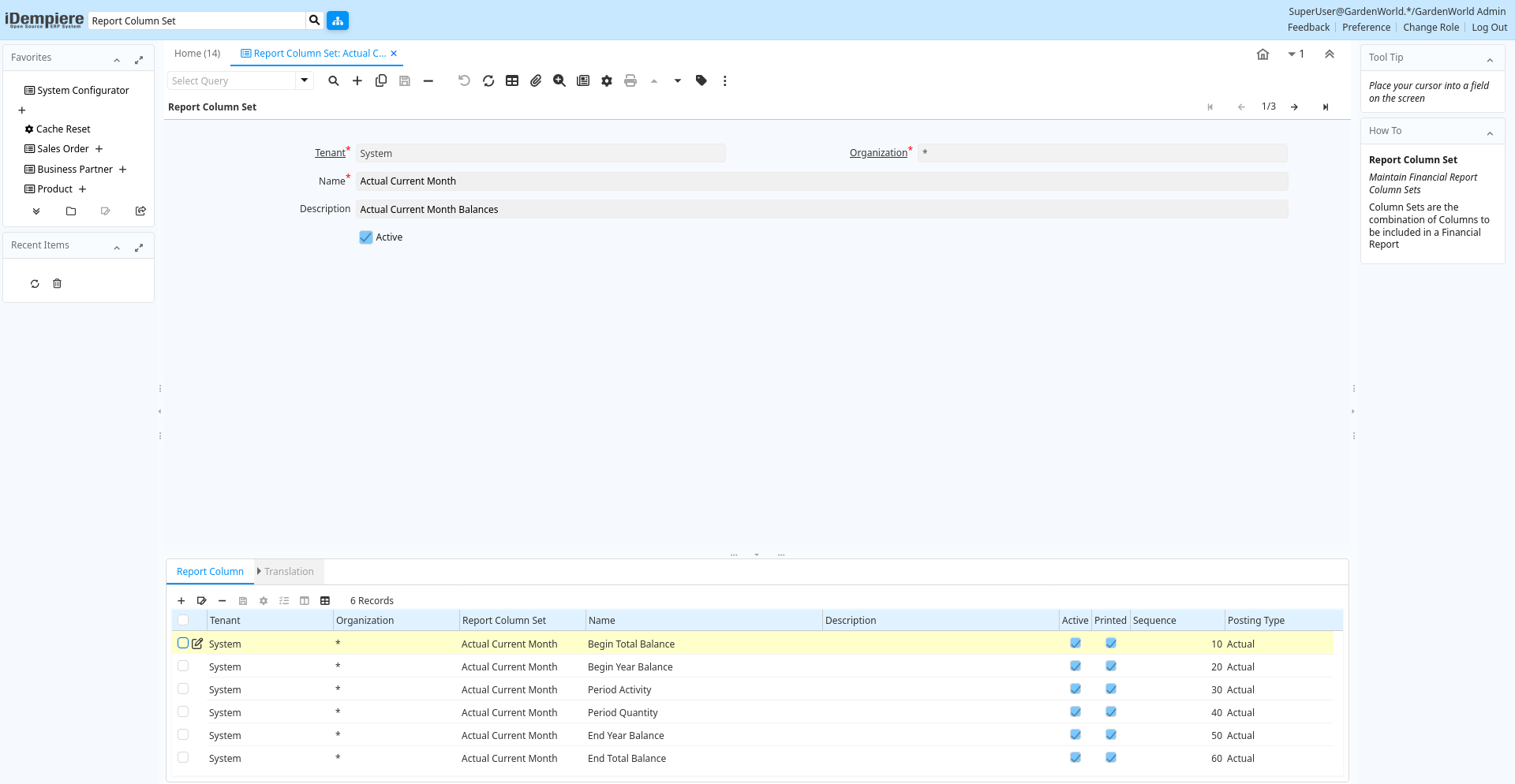
Tab: Report Column Set
[Created: 13/05/2001 - Updated: 02/01/2000 ]
Description: Maintain Financial Report Column Sets
Help: Column Sets are the combination of Columns to be included in a Financial Report
Tab Level: 0
Table 10: Report Column Set - Fields
Table: Report Parameters
| Name | Description | Help | Technical Info |
|---|---|---|---|
| Tenant | Tenant for this installation. | A Tenant is a company or a legal entity. You cannot share data between Tenants. | pa_reportcolumnset.AD_Client_ID numeric(10) Table Direct |
| Organization | Organizational entity within tenant | An organization is a unit of your tenant or legal entity - examples are store, department. You can share data between organizations. | pa_reportcolumnset.AD_Org_ID numeric(10) Table Direct |
| Name | Alphanumeric identifier of the entity | The name of an entity (record) is used as an default search option in addition to the search key. The name is up to 60 characters in length. | pa_reportcolumnset.Name character varying(60) String |
| Description | Optional short description of the record | A description is limited to 255 characters. | pa_reportcolumnset.Description character varying(255) String |
| Active | The record is active in the system | There are two methods of making records unavailable in the system: One is to delete the record, the other is to de-activate the record. A de-activated record is not available for selection, but available for reports.There are two reasons for de-activating and not deleting records:(1) The system requires the record for audit purposes.(2) The record is referenced by other records. E.g., you cannot delete a Business Partner, if there are invoices for this partner record existing. You de-activate the Business Partner and prevent that this record is used for future entries. | pa_reportcolumnset.IsActive character(1) Yes-No |
| Copy Columns | Copy Report Columns from other Column Set | Copy columns at the end of this Column Set. Please note that you need to re-set the calculation operands. | pa_reportcolumnset.Processing character(1) Button |
Tab: Report Column
[Created: 13/05/2001 - Updated: 02/01/2000 ]
Description: Maintain Financial Report Column
Help: A column represents a column in a Financial Report
Tab Level: 1
Table 20: Report Column - Fields
Table: Report Parameters
| Name | Description | Help | Technical Info |
|---|---|---|---|
| Tenant | Tenant for this installation. | A Tenant is a company or a legal entity. You cannot share data between Tenants. | pa_reportcolumn.AD_Client_ID numeric(10) Table Direct |
| Organization | Organizational entity within tenant | An organization is a unit of your tenant or legal entity - examples are store, department. You can share data between organizations. | pa_reportcolumn.AD_Org_ID numeric(10) Table Direct |
| Report Column Set | Collection of Columns for Report | The Report Column Set identifies the columns used in a Report. | pa_reportcolumn.PA_ReportColumnSet_ID numeric(10) Table Direct |
| Name | Alphanumeric identifier of the entity | The name of an entity (record) is used as an default search option in addition to the search key. The name is up to 60 characters in length. | pa_reportcolumn.Name character varying(255) String |
| Description | Optional short description of the record | A description is limited to 255 characters. | pa_reportcolumn.Description character varying(255) String |
| Active | The record is active in the system | There are two methods of making records unavailable in the system: One is to delete the record, the other is to de-activate the record. A de-activated record is not available for selection, but available for reports.There are two reasons for de-activating and not deleting records:(1) The system requires the record for audit purposes.(2) The record is referenced by other records. E.g., you cannot delete a Business Partner, if there are invoices for this partner record existing. You de-activate the Business Partner and prevent that this record is used for future entries. | pa_reportcolumn.IsActive character(1) Yes-No |
| Printed | Indicates if this document / line is printed | The Printed checkbox indicates if this document or line will included when printing. | pa_reportcolumn.IsPrinted character(1) Yes-No |
| Sequence | Method of ordering records; lowest number comes first | The Sequence indicates the order of records | pa_reportcolumn.SeqNo numeric(10) Integer |
| Posting Type | The type of posted amount for the transaction | The Posting Type indicates the type of amount (Actual, Budget, Reservation, Commitment, Statistical) the transaction. | pa_reportcolumn.PostingType character(1) List |
| Budget | General Ledger Budget | The General Ledger Budget identifies a user defined budget. These can be used in reporting as a comparison against your actual amounts. | pa_reportcolumn.GL_Budget_ID numeric(10) Table Direct |
| Amount Type | PA Amount Type for reporting | The amount type to report on: Quantity, Credit Only, Debit Only, Balance (expected sign) or Balance (accounted sign). "Expected sign" adjusts the sign of the result based on the Account Type and Expected Sign of each Account Element, whereas "accounted sign" always returns DR-CR. | pa_reportcolumn.PAAmountType character(1) List |
| Period Type | PA Period Type | The Period Type to report on: Period, Year, Total or Natural. Natural = Year for P & L accounts, Total for Balance Sheet accounts. | pa_reportcolumn.PAPeriodType character(1) List |
| Column Type | pa_reportcolumn.ColumnType character(1) List | ||
| Relative Period | Period offset (0 is current) | pa_reportcolumn.RelativePeriod numeric(10) Number | |
| Relative Period To | Period offset (0 is current) | pa_reportcolumn.RelativePeriodTo numeric Number | |
| Calculation | pa_reportcolumn.CalculationType character(1) List | ||
| Operand 1 | First operand for calculation | pa_reportcolumn.Oper_1_ID numeric(10) Table | |
| Operand 2 | Second operand for calculation | pa_reportcolumn.Oper_2_ID numeric(10) Table | |
| Operand 2 Line Name | Name of the financial report line to take values from | When specify this identified the name of the financial report line to take values from for column Oper_2_ID. No validation at entry time, value will be zero if the name doesn't match any line. | pa_reportcolumn.Oper_2_LineName character varying(512) String |
| Type | Element Type (account or user defined) | The Element Type indicates if this element is the Account element or is a User Defined element. | pa_reportcolumn.ElementType character(2) List |
| Organization | Organizational entity within tenant | An organization is a unit of your tenant or legal entity - examples are store, department. | pa_reportcolumn.Org_ID numeric(10) Table |
| Include Nulls in Org | Include nulls in the selection of the organization | pa_reportcolumn.IsIncludeNullsOrg character(1) Yes-No | |
| Trx Organization | Performing or initiating organization | The organization which performs or initiates this transaction (for another organization). The owning Organization may not be the transaction organization in a service bureau environment, with centralized services, and inter-organization transactions. | pa_reportcolumn.AD_OrgTrx_ID numeric(10) Table |
| Include Nulls in Org Trx | Include nulls in the selection of the organization transaction | pa_reportcolumn.IsIncludeNullsOrgTrx character(1) Yes-No | |
| Account Element | Account Element | Account Elements can be natural accounts or user defined values. | pa_reportcolumn.C_ElementValue_ID numeric(10) Search |
| Include Nulls in Account | Include nulls in the selection of the account | pa_reportcolumn.IsIncludeNullsElementValue character(1) Yes-No | |
| Product | Product, Service, Item | Identifies an item which is either purchased or sold in this organization. | pa_reportcolumn.M_Product_ID numeric(10) Search |
| Include Nulls in Product | Include nulls in the selection of the product | pa_reportcolumn.IsIncludeNullsProduct character(1) Yes-No | |
| Campaign | Marketing Campaign | The Campaign defines a unique marketing program. Projects can be associated with a pre defined Marketing Campaign. You can then report based on a specific Campaign. | pa_reportcolumn.C_Campaign_ID numeric(10) Table Direct |
| Include Nulls in Campaign | Include nulls in the selection of the campaign | pa_reportcolumn.IsIncludeNullsCampaign character(1) Yes-No | |
| Business Partner | Identifies a Business Partner | A Business Partner is anyone with whom you transact. This can include Vendor, Customer, Employee or Salesperson | pa_reportcolumn.C_BPartner_ID numeric(10) Search |
| Include Nulls in BPartner | Include nulls in the selection of the business partner | pa_reportcolumn.IsIncludeNullsBPartner character(1) Yes-No | |
| Project | Financial Project | A Project allows you to track and control internal or external activities. | pa_reportcolumn.C_Project_ID numeric(10) Table Direct |
| Include Nulls in Project | Include nulls in the selection of the project | pa_reportcolumn.IsIncludeNullsProject character(1) Yes-No | |
| Address | Location or Address | The Location / Address field defines the location of an entity. | pa_reportcolumn.C_Location_ID numeric(10) Location (Address) |
| Include Nulls in Location | Include nulls in the selection of the location | pa_reportcolumn.IsIncludeNullsLocation character(1) Yes-No | |
| Sales Region | Sales coverage region | The Sales Region indicates a specific area of sales coverage. | pa_reportcolumn.C_SalesRegion_ID numeric(10) Table Direct |
| Include Nulls in Sales Region | Include nulls in the selection of the sales region | pa_reportcolumn.IsIncludeNullsSalesRegion character(1) Yes-No | |
| Activity | Business Activity | Activities indicate tasks that are performed and used to utilize Activity based Costing | pa_reportcolumn.C_Activity_ID numeric(10) Table Direct |
| Include Nulls in Activity | Include nulls in the selection of the activity | pa_reportcolumn.IsIncludeNullsActivity character(1) Yes-No | |
| User Column 1 | User defined accounting Element | A user defined accounting element refers to an iDempiere table. This allows to use any table content as an accounting dimension (e.g. Project Task). Note that User Elements are optional and are populated from the context of the document (i.e. not requested) | pa_reportcolumn.UserElement1_ID numeric(10) ID |
| Include Nulls in User Element 1 | Include nulls in the selection of the user element 1 | pa_reportcolumn.IsIncludeNullsUserElement1 character(1) Yes-No | |
| User Column 2 | User defined accounting Element | A user defined accounting element refers to an iDempiere table. This allows to use any table content as an accounting dimension (e.g. Project Task). Note that User Elements are optional and are populated from the context of the document (i.e. not requested) | pa_reportcolumn.UserElement2_ID numeric(10) ID |
| Include Nulls in User Element 2 | Include nulls in the selection of the user element 2 | pa_reportcolumn.IsIncludeNullsUserElement2 character(1) Yes-No | |
| Format Pattern | The pattern used to format a number or date. | A string complying with either Java SimpleDateFormat or DecimalFormat pattern syntax used to override the default presentation format of a date or number type field. | pa_reportcolumn.FormatPattern character varying(22) String |
| Allow Opposite Sign | Allow column values to be displayed with the opposite sign | Allows values to be displayed with the opposite sign to the calculated value if the "Show Opposite Sign" flag is set on the Report Line. Note that all report calculations are performed before the sign is reversed. | pa_reportcolumn.IsAllowOppositeSign character(1) Yes-No |
| Multiplier | Type Multiplier (Credit = -1) | pa_reportcolumn.Multiplier numeric Number | |
| Round Factor | pa_reportcolumn.RoundFactor numeric(10) Integer |
Tab: Translation
[Created: 22/08/2019 - Updated: 27/10/2024 ]
Description:
Help:
Tab Level: 2
Table 30: Translation - Fields
Table: Report Parameters
| Name | Description | Help | Technical Info |
|---|---|---|---|
| Tenant | Tenant for this installation. | A Tenant is a company or a legal entity. You cannot share data between Tenants. | pa_reportcolumn_trl.AD_Client_ID numeric(10) Table Direct |
| Organization | Organizational entity within tenant | An organization is a unit of your tenant or legal entity - examples are store, department. You can share data between organizations. | pa_reportcolumn_trl.AD_Org_ID numeric(10) Table Direct |
| Report Column | Column in Report | pa_reportcolumn_trl.PA_ReportColumn_ID numeric(10) Table Direct | |
| Language | Language for this entity | The Language identifies the language to use for display and formatting | pa_reportcolumn_trl.AD_Language character varying(6) Table |
| Name | Alphanumeric identifier of the entity | The name of an entity (record) is used as an default search option in addition to the search key. The name is up to 60 characters in length. | pa_reportcolumn_trl.Name character varying(255) String |
| Description | Optional short description of the record | A description is limited to 255 characters. | pa_reportcolumn_trl.Description character varying(255) String |
| Active | The record is active in the system | There are two methods of making records unavailable in the system: One is to delete the record, the other is to de-activate the record. A de-activated record is not available for selection, but available for reports.There are two reasons for de-activating and not deleting records:(1) The system requires the record for audit purposes.(2) The record is referenced by other records. E.g., you cannot delete a Business Partner, if there are invoices for this partner record existing. You de-activate the Business Partner and prevent that this record is used for future entries. | pa_reportcolumn_trl.IsActive character(1) Yes-No |
| Translated | This column is translated | The Translated checkbox indicates if this column is translated. | pa_reportcolumn_trl.IsTranslated character(1) Yes-No |