Window: Vendor RMA
[Created: 11/09/2009 - Updated: 11/09/2009 ]
Description: Manage Return Material Authorization
Help: A Return Material Authorization may be required to accept returns and to create Credit Memos
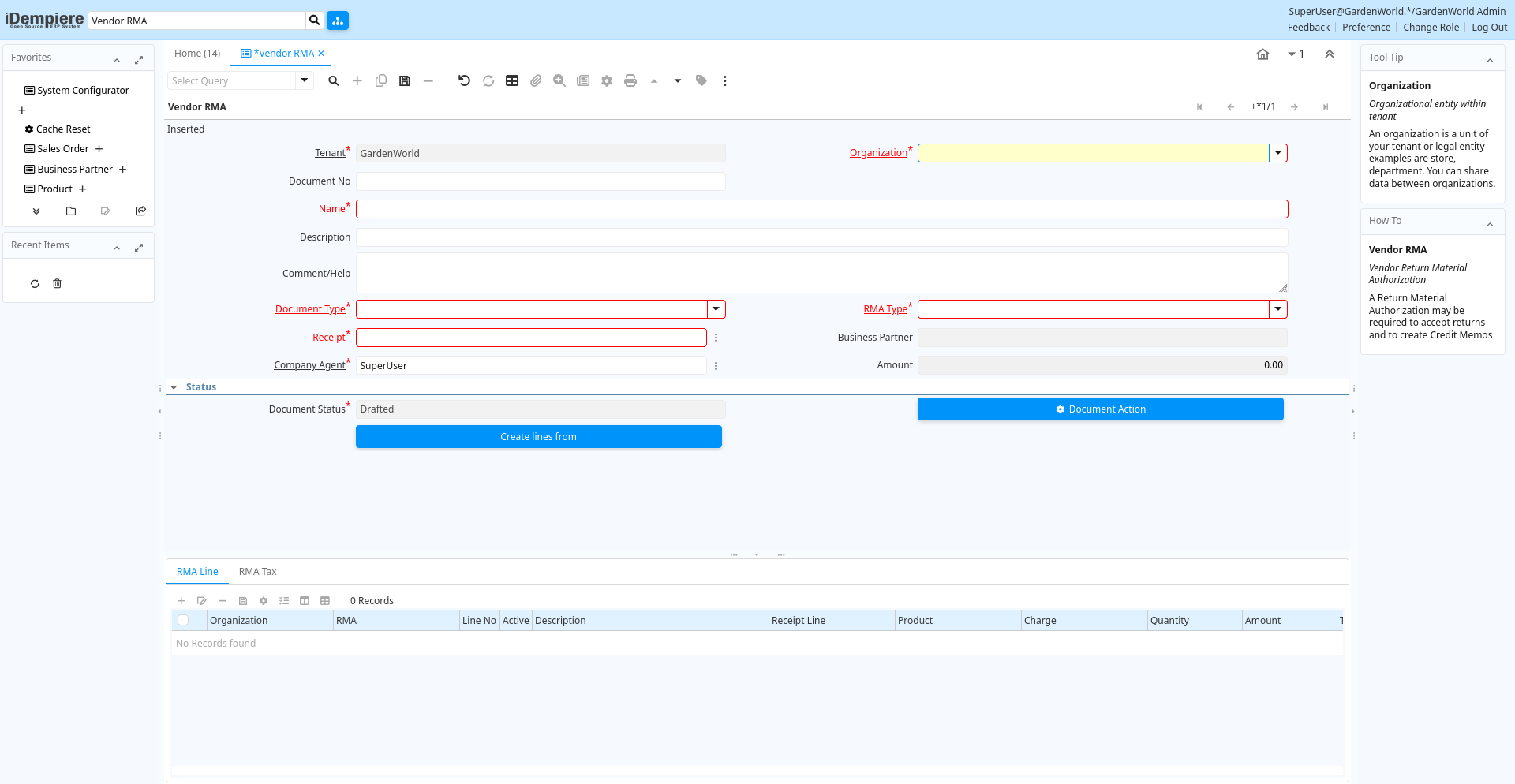
Tab: Vendor RMA
[Created: 11/09/2009 - Updated: 30/09/2009 ]
Description: Vendor Return Material Authorization
Help: A Return Material Authorization may be required to accept returns and to create Credit Memos
Tab Level: 0
Table 10: Vendor RMA - Fields
Table: Report Parameters
| Name | Description | Help | Technical Info |
|---|---|---|---|
| Tenant | Tenant for this installation. | A Tenant is a company or a legal entity. You cannot share data between Tenants. | m_rma.AD_Client_ID numeric(10) Table Direct |
| Organization | Organizational entity within tenant | An organization is a unit of your tenant or legal entity - examples are store, department. You can share data between organizations. | m_rma.AD_Org_ID numeric(10) Table Direct |
| Document No | Document sequence number of the document | The document number is usually automatically generated by the system and determined by the document type of the document. If the document is not saved, the preliminary number is displayed in "".If the document type of your document has no automatic document sequence defined, the field is empty if you create a new document. This is for documents which usually have an external number (like vendor invoice). If you leave the field empty, the system will generate a document number for you. The document sequence used for this fallback number is defined in the "Maintain Sequence" window with the name "DocumentNo_", where TableName is the actual name of the table (e.g. C_Order). | m_rma.DocumentNo character varying(30) String |
| Name | Alphanumeric identifier of the entity | The name of an entity (record) is used as an default search option in addition to the search key. The name is up to 60 characters in length. | m_rma.Name character varying(60) String |
| Description | Optional short description of the record | A description is limited to 255 characters. | m_rma.Description character varying(255) String |
| Comment/Help | Comment or Hint | The Help field contains a hint, comment or help about the use of this item. | m_rma.Help character varying(2000) Text |
| Document Type | Document type or rules | The Document Type determines document sequence and processing rules | m_rma.C_DocType_ID numeric(10) Table |
| RMA Type | Return Material Authorization Type | Types of RMA | m_rma.M_RMAType_ID numeric(10) Table Direct |
| Receipt | Material Receipt Document | The Material Shipment / Receipt | m_rma.InOut_ID numeric(10) Search |
| Business Partner | Identifies a Business Partner | A Business Partner is anyone with whom you transact. This can include Vendor, Customer, Employee or Salesperson | m_rma.C_BPartner_ID numeric(10) Search |
| Company Agent | Purchase or Company Agent | Purchase agent for the document. Any Sales Rep must be a valid internal user. | m_rma.SalesRep_ID numeric(10) Search |
| Amount | Amount | Amount | m_rma.Amt numeric Amount |
| Document Status | The current status of the document | The Document Status indicates the status of a document at this time. If you want to change the document status, use the Document Action field | m_rma.DocStatus character(2) List |
| Process RMA | m_rma.DocAction character(2) Button | ||
| Purchase Order | Purchase Order | The Purchase Order is a control document. The Purchase Order is complete when the quantity ordered is the same as the quantity shipped and invoiced. When you close an order, unshipped (backordered) quantities are cancelled. | m_rma.C_Order_ID numeric(10) Search |
| Create lines from | Process which will generate a new document lines based on an existing document | The Create From process will create a new document based on information in an existing document selected by the user. | m_rma.CreateLinesFrom character(1) Button |
| Create Order From RMA | Creates an order based on this RMA Document. The RMA should be correct and completed. | Generate Order from RMA will create an order based on this RMA document. | m_rma.GenerateTo character(1) Button |
Tab: RMA Line
[Created: 11/09/2009 - Updated: 16/03/2021 ]
Description: Return Material Authorization Line
Help: Detail information about the returned goods
Tab Level: 1
Table 20: RMA Line - Fields
Table: Report Parameters
| Name | Description | Help | Technical Info |
|---|---|---|---|
| Tenant | Tenant for this installation. | A Tenant is a company or a legal entity. You cannot share data between Tenants. | m_rmaline.AD_Client_ID numeric(10) Table Direct |
| Organization | Organizational entity within tenant | An organization is a unit of your tenant or legal entity - examples are store, department. You can share data between organizations. | m_rmaline.AD_Org_ID numeric(10) Table Direct |
| RMA | Return Material Authorization | A Return Material Authorization may be required to accept returns and to create Credit Memos | m_rmaline.M_RMA_ID numeric(10) Search |
| Line No | Unique line for this document | Indicates the unique line for a document. It will also control the display order of the lines within a document. | m_rmaline.Line numeric(10) Integer |
| Active | The record is active in the system | There are two methods of making records unavailable in the system: One is to delete the record, the other is to de-activate the record. A de-activated record is not available for selection, but available for reports.There are two reasons for de-activating and not deleting records:(1) The system requires the record for audit purposes.(2) The record is referenced by other records. E.g., you cannot delete a Business Partner, if there are invoices for this partner record existing. You de-activate the Business Partner and prevent that this record is used for future entries. | m_rmaline.IsActive character(1) Yes-No |
| Description | Optional short description of the record | A description is limited to 255 characters. | m_rmaline.Description character varying(255) String |
| Receipt Line | Line on Receipt document | m_rmaline.M_InOutLine_ID numeric(10) Table Direct | |
| Product | Product, Service, Item | Identifies an item which is either purchased or sold in this organization. | m_rmaline.M_Product_ID numeric(10) Search |
| Charge | Additional document charges | The Charge indicates a type of Charge (Handling, Shipping, Restocking) | m_rmaline.C_Charge_ID numeric(10) Table Direct |
| Quantity | Quantity | The Quantity indicates the number of a specific product or item for this document. | m_rmaline.Qty numeric Quantity |
| Amount | Amount | Amount | m_rmaline.Amt numeric Amount |
| Tax | Tax identifier | The Tax indicates the type of tax used in document line. | m_rmaline.C_Tax_ID numeric(10) Table Direct |
| Line Amount | Line Extended Amount (Quantity * Actual Price) without Freight and Charges | Indicates the extended line amount based on the quantity and the actual price. Any additional charges or freight are not included. The Amount may or may not include tax. If the price list is inclusive tax, the line amount is the same as the line total. | m_rmaline.LineNetAmt numeric Amount |
Tab: RMA Tax
[Created: 18/01/2013 - Updated: 18/01/2013 ]
Description: RMA Tax
Help: The RMA Tax Tab displays the tax associated with the RMA Lines.
Tab Level: 1
Table 30: RMA Tax - Fields
Table: Report Parameters
| Name | Description | Help | Technical Info |
|---|---|---|---|
| Tenant | Tenant for this installation. | A Tenant is a company or a legal entity. You cannot share data between Tenants. | m_rmatax.AD_Client_ID numeric(10) Table Direct |
| Organization | Organizational entity within tenant | An organization is a unit of your tenant or legal entity - examples are store, department. You can share data between organizations. | m_rmatax.AD_Org_ID numeric(10) Table Direct |
| RMA | Return Material Authorization | A Return Material Authorization may be required to accept returns and to create Credit Memos | m_rmatax.M_RMA_ID numeric(10) Search |
| Tax | Tax identifier | The Tax indicates the type of tax used in document line. | m_rmatax.C_Tax_ID numeric(10) Table Direct |
| Tax Provider | m_rmatax.C_TaxProvider_ID numeric(10) Table Direct | ||
| Tax Amount | Tax Amount for a document | The Tax Amount displays the total tax amount for a document. | m_rmatax.TaxAmt numeric Amount |
| Tax base Amount | Base for calculating the tax amount | The Tax Base Amount indicates the base amount used for calculating the tax amount. | m_rmatax.TaxBaseAmt numeric Amount |
| Price includes Tax | Tax is included in the price | The Tax Included checkbox indicates if the prices include tax. This is also known as the gross price. | m_rmatax.IsTaxIncluded character(1) Yes-No |