Window: Warehouse and Locators
[Created: 09/08/1999 - Updated: 08/12/2023 ]
Description: Maintain Warehouses and Locators
Help: The Warehouse and Locators Window defines each Warehouse, any Locators for that Warehouse and the Accounting parameters to be used for inventory in that Warehouse.
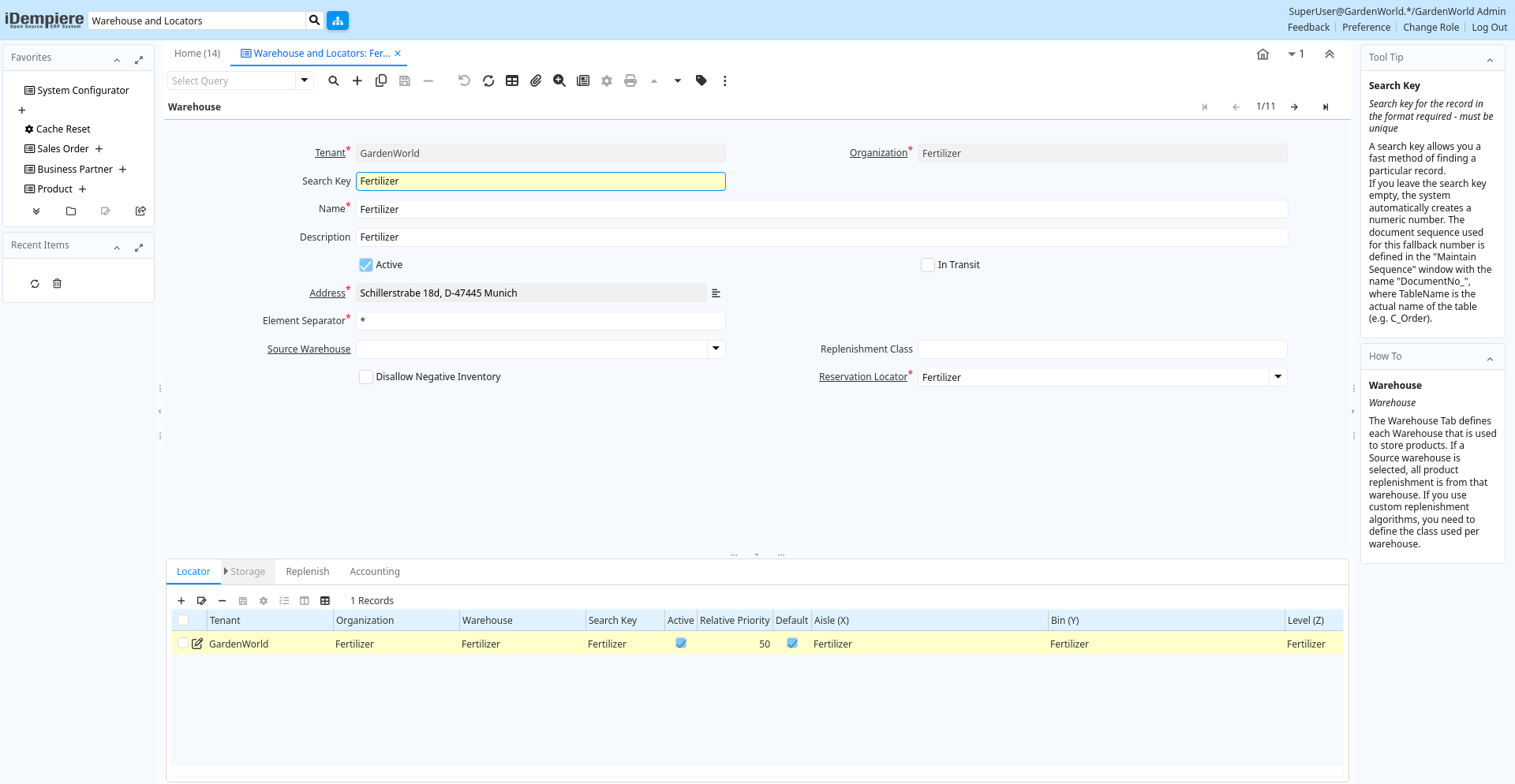
Tab: Warehouse
[Created: 09/08/1999 - Updated: 21/07/2005 ]
Description: Warehouse
Help: The Warehouse Tab defines each Warehouse that is used to store products. If a Source warehouse is selected, all product replenishment is from that warehouse. If you use custom replenishment algorithms, you need to define the class used per warehouse.
Tab Level: 0
Table 10: Warehouse - Fields
Table: Report Parameters
| Name | Description | Help | Technical Info |
|---|---|---|---|
| Tenant | Tenant for this installation. | A Tenant is a company or a legal entity. You cannot share data between Tenants. | m_warehouse.AD_Client_ID numeric(10) Table Direct |
| Organization | Organizational entity within tenant | An organization is a unit of your tenant or legal entity - examples are store, department. You can share data between organizations. | m_warehouse.AD_Org_ID numeric(10) Table Direct |
| Search Key | Search key for the record in the format required - must be unique | A search key allows you a fast method of finding a particular record.If you leave the search key empty, the system automatically creates a numeric number. The document sequence used for this fallback number is defined in the "Maintain Sequence" window with the name "DocumentNo_", where TableName is the actual name of the table (e.g. C_Order). | m_warehouse.Value character varying(40) String |
| Name | Alphanumeric identifier of the entity | The name of an entity (record) is used as an default search option in addition to the search key. The name is up to 60 characters in length. | m_warehouse.Name character varying(60) String |
| Description | Optional short description of the record | A description is limited to 255 characters. | m_warehouse.Description character varying(255) String |
| Active | The record is active in the system | There are two methods of making records unavailable in the system: One is to delete the record, the other is to de-activate the record. A de-activated record is not available for selection, but available for reports.There are two reasons for de-activating and not deleting records:(1) The system requires the record for audit purposes.(2) The record is referenced by other records. E.g., you cannot delete a Business Partner, if there are invoices for this partner record existing. You de-activate the Business Partner and prevent that this record is used for future entries. | m_warehouse.IsActive character(1) Yes-No |
| In Transit | Movement is in transit | Material Movement is in transit - shipped, but not received.The transaction is completed, if confirmed. | m_warehouse.IsInTransit character(1) Yes-No |
| Address | Location or Address | The Location / Address field defines the location of an entity. | m_warehouse.C_Location_ID numeric(10) Location (Address) |
| Element Separator | Element Separator | The Element Separator defines the delimiter printed between elements of the structure | m_warehouse.Separator character(1) String |
| Source Warehouse | Optional Warehouse to replenish from | If defined, the warehouse selected is used to replenish the product(s) | m_warehouse.M_WarehouseSource_ID numeric(10) Table |
| Replenishment Class | Custom class to calculate Quantity to Order | If you select a custom replenishment type, you need to create a class implementing org.compiere.util.ReplenishInterface and set that on warehouse level. | m_warehouse.ReplenishmentClass character varying(60) String |
| Disallow Negative Inventory | Negative Inventory is not allowed in this warehouse | If checked, any transaction that results in the onhand inventory being driven negative will be prevented. | m_warehouse.IsDisallowNegativeInv character(1) Yes-No |
| Reservation Locator | Reservation Locator (just for reporting purposes) | m_warehouse.M_ReserveLocator_ID numeric(10) Table |
Tab: Locator
[Created: 09/08/1999 - Updated: 02/01/2000 ]
Description: Locator
Help: The Locator Tab defines any Locators for that Warehouse.
Tab Level: 1
Table 20: Locator - Fields
Table: Report Parameters
| Name | Description | Help | Technical Info |
|---|---|---|---|
| Tenant | Tenant for this installation. | A Tenant is a company or a legal entity. You cannot share data between Tenants. | m_locator.AD_Client_ID numeric(10) Table Direct |
| Organization | Organizational entity within tenant | An organization is a unit of your tenant or legal entity - examples are store, department. You can share data between organizations. | m_locator.AD_Org_ID numeric(10) Table Direct |
| Warehouse | Storage Warehouse and Service Point | The Warehouse identifies a unique Warehouse where products are stored or Services are provided. | m_locator.M_Warehouse_ID numeric(10) Table Direct |
| Search Key | Search key for the record in the format required - must be unique | A search key allows you a fast method of finding a particular record.If you leave the search key empty, the system automatically creates a numeric number. The document sequence used for this fallback number is defined in the "Maintain Sequence" window with the name "DocumentNo_", where TableName is the actual name of the table (e.g. C_Order). | m_locator.Value character varying(40) String |
| Locator Type | m_locator.M_LocatorType_ID numeric(10) Table Direct | ||
| Active | The record is active in the system | There are two methods of making records unavailable in the system: One is to delete the record, the other is to de-activate the record. A de-activated record is not available for selection, but available for reports.There are two reasons for de-activating and not deleting records:(1) The system requires the record for audit purposes.(2) The record is referenced by other records. E.g., you cannot delete a Business Partner, if there are invoices for this partner record existing. You de-activate the Business Partner and prevent that this record is used for future entries. | m_locator.IsActive character(1) Yes-No |
| Relative Priority | Where inventory should be picked from first | The Relative Priority indicates the location to pick from first if an product is stored in more than one location. (100 = highest priority, 0 = lowest). For outgoing shipments, the location is picked with the highest priority where the entire quantity can be shipped from. If there is no location, the location with the highest priority is used.The Priority is ignored for products with Guarantee Date (always the oldest first) or if a specific instance is selected.Incoming receipts are stored at the location with the highest priority, if not explicitly selected. | m_locator.PriorityNo numeric(10) Integer |
| Default | Default value | The Default Checkbox indicates if this record will be used as a default value. | m_locator.IsDefault character(1) Yes-No |
| Aisle (X) | X dimension, e.g., Aisle | The X dimension indicates the Aisle a product is located in. | m_locator.X character varying(60) String |
| Bin (Y) | Y dimension, e.g., Bin | The Y dimension indicates the Bin a product is located in | m_locator.Y character varying(60) String |
| Level (Z) | Z dimension, e.g., Level | The Z dimension indicates the Level a product is located in. | m_locator.Z character varying(60) String |
Tab: Storage
[Created: 09/08/1999 - Updated: 19/11/2012 ]
Description: Detail Storage Information
Help:
Tab Level: 2
Table 30: Storage - Fields
Table: Report Parameters
| Name | Description | Help | Technical Info |
|---|---|---|---|
| Tenant | Tenant for this installation. | A Tenant is a company or a legal entity. You cannot share data between Tenants. | m_storage.AD_Client_ID numeric(10) Table Direct |
| Organization | Organizational entity within tenant | An organization is a unit of your tenant or legal entity - examples are store, department. You can share data between organizations. | m_storage.AD_Org_ID numeric(10) Table Direct |
| Locator | Warehouse Locator | The Locator indicates where in a Warehouse a product is located. | m_storage.M_Locator_ID numeric(10) Locator (WH) |
| Date Material Policy | Time used for LIFO and FIFO Material Policy | This field is used to record time used for LIFO and FIFO material policy | m_storage.DateMaterialPolicy timestamp without time zone Date |
| Product | Product, Service, Item | Identifies an item which is either purchased or sold in this organization. | m_storage.M_Product_ID numeric(10) Search |
| Attribute Set Instance | Product Attribute Set Instance | The values of the actual Product Attribute Instances. The product level attributes are defined on Product level. | m_storage.M_AttributeSetInstance_ID numeric(10) Product Attribute |
| Active | The record is active in the system | There are two methods of making records unavailable in the system: One is to delete the record, the other is to de-activate the record. A de-activated record is not available for selection, but available for reports.There are two reasons for de-activating and not deleting records:(1) The system requires the record for audit purposes.(2) The record is referenced by other records. E.g., you cannot delete a Business Partner, if there are invoices for this partner record existing. You de-activate the Business Partner and prevent that this record is used for future entries. | m_storage.IsActive character(1) Yes-No |
| On Hand Quantity | On Hand Quantity | The On Hand Quantity indicates the quantity of a product that is on hand in a warehouse. | m_storage.QtyOnHand numeric Quantity |
| Date Last Inventory Count | Date of Last Inventory Count | The Date Last Inventory Count indicates the last time an Inventory count was done. | m_storage.DateLastInventory timestamp without time zone Date |
| Reserved Quantity | Reserved Quantity | The Reserved Quantity indicates the quantity of a product that is currently reserved. | m_storage.QtyReserved numeric Quantity |
| Ordered Quantity | Ordered Quantity | The Ordered Quantity indicates the quantity of a product that was ordered. | m_storage.QtyOrdered numeric Quantity |
Tab: Replenish
[Created: 21/07/2005 - Updated: 21/07/2005 ]
Description: Define Product Replenishment
Help: The Replenishment Tab defines the type of replenishment quantities. This is used for automated ordering. If you select a custom replenishment type, you need to create a class implementing org.compiere.util.ReplenishInterface and set that on warehouse level.
Tab Level: 1
Table 35: Replenish - Fields
Table: Report Parameters
| Name | Description | Help | Technical Info |
|---|---|---|---|
| Tenant | Tenant for this installation. | A Tenant is a company or a legal entity. You cannot share data between Tenants. | m_replenish.AD_Client_ID numeric(10) Table Direct |
| Organization | Organizational entity within tenant | An organization is a unit of your tenant or legal entity - examples are store, department. You can share data between organizations. | m_replenish.AD_Org_ID numeric(10) Table Direct |
| Warehouse | Storage Warehouse and Service Point | The Warehouse identifies a unique Warehouse where products are stored or Services are provided. | m_replenish.M_Warehouse_ID numeric(10) Table Direct |
| Product | Product, Service, Item | Identifies an item which is either purchased or sold in this organization. | m_replenish.M_Product_ID numeric(10) Search |
| Active | The record is active in the system | There are two methods of making records unavailable in the system: One is to delete the record, the other is to de-activate the record. A de-activated record is not available for selection, but available for reports.There are two reasons for de-activating and not deleting records:(1) The system requires the record for audit purposes.(2) The record is referenced by other records. E.g., you cannot delete a Business Partner, if there are invoices for this partner record existing. You de-activate the Business Partner and prevent that this record is used for future entries. | m_replenish.IsActive character(1) Yes-No |
| Replenish Type | Method for re-ordering a product | The Replenish Type indicates if this product will be manually re-ordered, ordered when the quantity is below the minimum quantity or ordered when it is below the maximum quantity. If you select a custom replenishment type, you need to create a class implementing org.compiere.util.ReplenishInterface and set that on warehouse level. | m_replenish.ReplenishType character(1) List |
| Minimum Level | Minimum Inventory level for this product | Indicates the minimum quantity of this product to be stocked in inventory. | m_replenish.Level_Min numeric Amount |
| Maximum Level | Maximum Inventory level for this product | Indicates the maximum quantity of this product to be stocked in inventory. | m_replenish.Level_Max numeric Amount |
| Source Warehouse | Optional Warehouse to replenish from | If defined, the warehouse selected is used to replenish the product(s) | m_replenish.M_WarehouseSource_ID numeric(10) Table |
| Locator | Warehouse Locator | The Locator indicates where in a Warehouse a product is located. | m_replenish.M_Locator_ID numeric(10) Table Direct |
Tab: Accounting
[Created: 26/09/1999 - Updated: 05/03/2013 ]
Description: Accounting
Help: The Accounting Tab defines the Accounting parameters to be used for inventory in that Warehouse.
Tab Level: 1
Table 40: Accounting - Fields
Table: Report Parameters
| Name | Description | Help | Technical Info |
|---|---|---|---|
| Tenant | Tenant for this installation. | A Tenant is a company or a legal entity. You cannot share data between Tenants. | m_warehouse_acct.AD_Client_ID numeric(10) Table Direct |
| Organization | Organizational entity within tenant | An organization is a unit of your tenant or legal entity - examples are store, department. You can share data between organizations. | m_warehouse_acct.AD_Org_ID numeric(10) Table Direct |
| Warehouse | Storage Warehouse and Service Point | The Warehouse identifies a unique Warehouse where products are stored or Services are provided. | m_warehouse_acct.M_Warehouse_ID numeric(10) Table Direct |
| Accounting Schema | Rules for accounting | An Accounting Schema defines the rules used in accounting such as costing method, currency and calendar | m_warehouse_acct.C_AcctSchema_ID numeric(10) Table Direct |
| Active | The record is active in the system | There are two methods of making records unavailable in the system: One is to delete the record, the other is to de-activate the record. A de-activated record is not available for selection, but available for reports.There are two reasons for de-activating and not deleting records:(1) The system requires the record for audit purposes.(2) The record is referenced by other records. E.g., you cannot delete a Business Partner, if there are invoices for this partner record existing. You de-activate the Business Partner and prevent that this record is used for future entries. | m_warehouse_acct.IsActive character(1) Yes-No |
| Warehouse Differences | Warehouse Differences Account | The Warehouse Differences Account indicates the account used recording differences identified during inventory counts. | m_warehouse_acct.W_Differences_Acct numeric(10) Account |