Window: Report and Process
[Created: 11/12/1999 - Updated: 08/12/2023 ]
Description: Maintain Reports & Processes
Help: The Report & Process Window is used to define the parameters and access rules for every Report and Process within the system. This window is for System Admin use only.
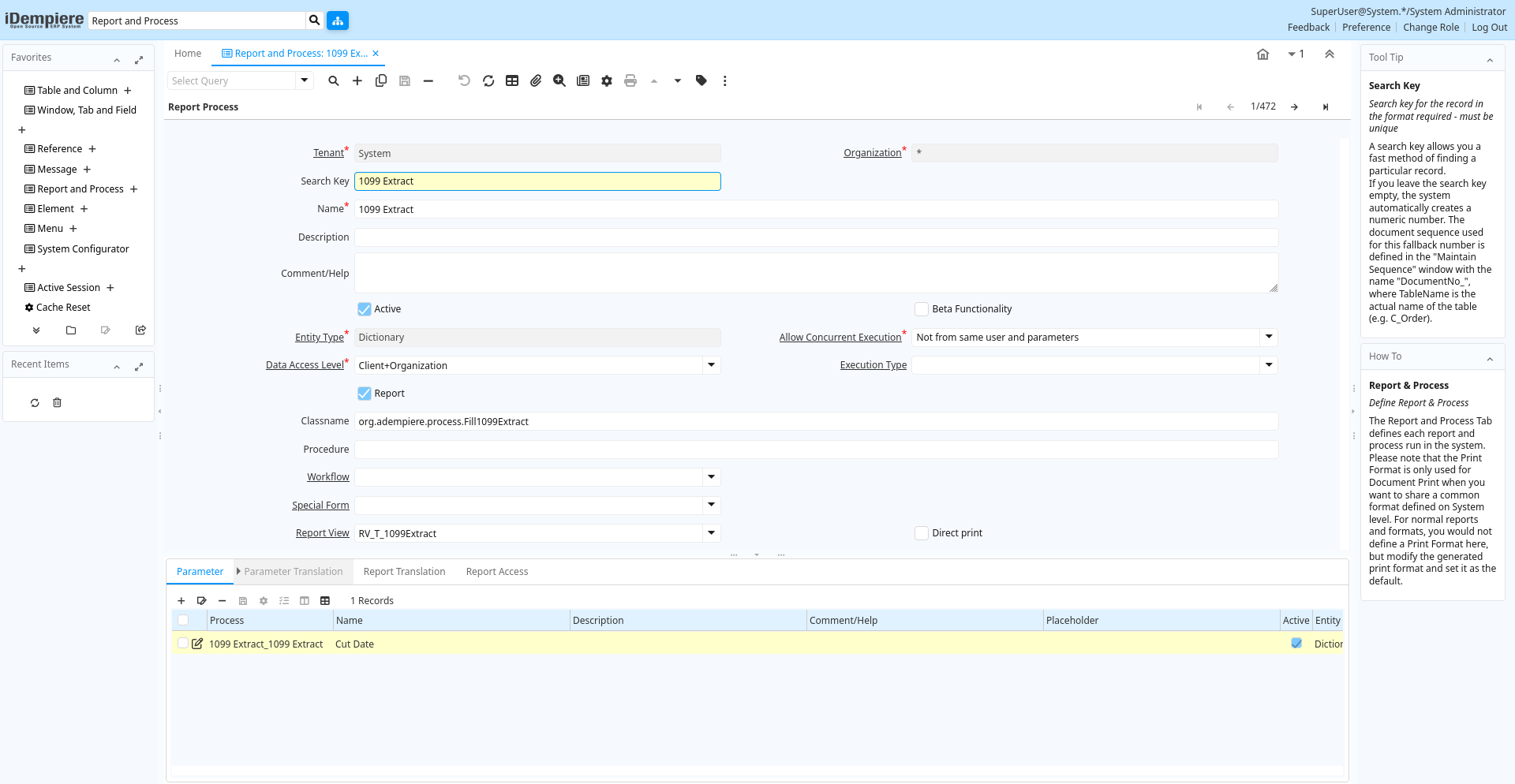
Tab: Report & Process
[Created: 11/12/1999 - Updated: 02/01/2000 ]
Description: Define Report & Process
Help: The Report and Process Tab defines each report and process run in the system. Please note that the Print Format is only used for Document Print when you want to share a common format defined on System level. For normal reports and formats, you would not define a Print Format here, but modify the generated print format and set it as the default.
Tab Level: 0
Table 10: Report & Process - Fields
Table: Report Parameters
| Name | Description | Help | Technical Info |
|---|---|---|---|
| Tenant | Tenant for this installation. | A Tenant is a company or a legal entity. You cannot share data between Tenants. | ad_process.AD_Client_ID numeric(10) Table Direct |
| Organization | Organizational entity within tenant | An organization is a unit of your tenant or legal entity - examples are store, department. You can share data between organizations. | ad_process.AD_Org_ID numeric(10) Table Direct |
| Search Key | Search key for the record in the format required - must be unique | A search key allows you a fast method of finding a particular record.If you leave the search key empty, the system automatically creates a numeric number. The document sequence used for this fallback number is defined in the "Maintain Sequence" window with the name "DocumentNo_", where TableName is the actual name of the table (e.g. C_Order). | ad_process.Value character varying(40) String |
| Name | Alphanumeric identifier of the entity | The name of an entity (record) is used as an default search option in addition to the search key. The name is up to 60 characters in length. | ad_process.Name character varying(60) String |
| Description | Optional short description of the record | A description is limited to 255 characters. | ad_process.Description character varying(255) String |
| Comment/Help | Comment or Hint | The Help field contains a hint, comment or help about the use of this item. | ad_process.Help character varying(2000) Text |
| Active | The record is active in the system | There are two methods of making records unavailable in the system: One is to delete the record, the other is to de-activate the record. A de-activated record is not available for selection, but available for reports.There are two reasons for de-activating and not deleting records:(1) The system requires the record for audit purposes.(2) The record is referenced by other records. E.g., you cannot delete a Business Partner, if there are invoices for this partner record existing. You de-activate the Business Partner and prevent that this record is used for future entries. | ad_process.IsActive character(1) Yes-No |
| Beta Functionality | This functionality is considered Beta | Beta functionality is not fully tested or completed. | ad_process.IsBetaFunctionality character(1) Yes-No |
| Entity Type | Dictionary Entity Type; Determines ownership and synchronization | The Entity Types "Dictionary", "iDempiere" and "Application" might be automatically synchronized and customizations deleted or overwritten. For customizations, copy the entity and select "User"! | ad_process.EntityType character varying(40) Table |
| Allow Concurrent Execution | Allow or disallow executing a process/report multiple times concurrently | ad_process.AllowMultipleExecution character varying(2) List | |
| Data Access Level | Access Level required | Indicates the access level required for this record or process. | ad_process.AccessLevel character(1) List |
| Execution Type | Execution Type defines whether the report/process will always run in background or foreground. | Execution Type defines whether the report/process will always run in background or foreground. The System Configurator "BACKGROUND_JOB_ALLOWED" has greater precedence. | ad_process.ExecutionType character(1) List |
| Report | Indicates a Report record | The Report checkbox indicates that this record is a report as opposed to a process | ad_process.IsReport character(1) Yes-No |
| Classname | Java Classname | The Classname identifies the Java classname used by this report or process. | ad_process.Classname character varying(255) String |
| Procedure | Name of the Database Procedure | The Procedure indicates the name of the database procedure called by this report or process. | ad_process.ProcedureName character varying(60) String |
| Workflow | Workflow or combination of tasks | The Workflow field identifies a unique Workflow in the system. | ad_process.AD_Workflow_ID numeric(10) Table Direct |
| Special Form | Special Form | The Special Form field identifies a unique Special Form in the system. | ad_process.AD_Form_ID numeric(10) Table Direct |
| Report View | View used to generate this report | The Report View indicates the view used to generate this report. | ad_process.AD_ReportView_ID numeric(10) Table Direct |
| Direct print | Print without dialog | The Direct Print checkbox indicates that this report will print without a print dialog box being displayed. | ad_process.IsDirectPrint character(1) Yes-No |
| Print Format | Data Print Format | The print format determines how data is rendered for print. | ad_process.AD_PrintFormat_ID numeric(10) Table Direct |
| File Name Pattern | ad_process.FileNamePattern character varying(255) String | ||
| Show Help | ad_process.ShowHelp character(1) List | ||
| Statistic Count | Internal statistics how often the entity was used | For internal use. | ad_process.Statistic_Count numeric(10) Integer |
| Statistic Seconds | Internal statistics how many seconds a process took | For internal use | ad_process.Statistic_Seconds numeric Integer |
| Jasper Report | ad_process.JasperReport character varying(255) String | ||
| Context Help | ad_process.AD_CtxHelp_ID numeric(10) Search | ||
| Copy From Report and Process | Copy settings from one report and process to another. | Copy the settings from the selected report and process to the current one. This overwrites existing settings and translations. | ad_process.CopyFromProcess character(1) Button |
Tab: Parameter
[Created: 11/12/1999 - Updated: 16/11/2012 ]
Description: Report Parameter
Help: The Report Parameter Tab defines any parameters required to execute a report or process.
Tab Level: 1
Table 20: Parameter - Fields
Table: Report Parameters
| Name | Description | Help | Technical Info |
|---|---|---|---|
| Tenant | Tenant for this installation. | A Tenant is a company or a legal entity. You cannot share data between Tenants. | ad_process_para.AD_Client_ID numeric(10) Table Direct |
| Organization | Organizational entity within tenant | An organization is a unit of your tenant or legal entity - examples are store, department. You can share data between organizations. | ad_process_para.AD_Org_ID numeric(10) Table Direct |
| Process | Process or Report | The Process field identifies a unique Process or Report in the system. | ad_process_para.AD_Process_ID numeric(10) Table Direct |
| Name | Alphanumeric identifier of the entity | The name of an entity (record) is used as an default search option in addition to the search key. The name is up to 60 characters in length. | ad_process_para.Name character varying(60) String |
| Description | Optional short description of the record | A description is limited to 255 characters. | ad_process_para.Description character varying(255) String |
| Comment/Help | Comment or Hint | The Help field contains a hint, comment or help about the use of this item. | ad_process_para.Help character varying(2000) Text |
| Placeholder | ad_process_para.Placeholder character varying(255) String | ||
| Active | The record is active in the system | There are two methods of making records unavailable in the system: One is to delete the record, the other is to de-activate the record. A de-activated record is not available for selection, but available for reports.There are two reasons for de-activating and not deleting records:(1) The system requires the record for audit purposes.(2) The record is referenced by other records. E.g., you cannot delete a Business Partner, if there are invoices for this partner record existing. You de-activate the Business Partner and prevent that this record is used for future entries. | ad_process_para.IsActive character(1) Yes-No |
| Centrally maintained | Information maintained in System Element table | The Centrally Maintained checkbox indicates if the Name, Description and Help maintained in 'System Element' table or 'Window' table. | ad_process_para.IsCentrallyMaintained character(1) Yes-No |
| Sequence | Method of ordering records; lowest number comes first | The Sequence indicates the order of records | ad_process_para.SeqNo numeric(10) Integer |
| Entity Type | Dictionary Entity Type; Determines ownership and synchronization | The Entity Types "Dictionary", "iDempiere" and "Application" might be automatically synchronized and customizations deleted or overwritten. For customizations, copy the entity and select "User"! | ad_process_para.EntityType character varying(40) Table |
| DB Column Name | Name of the column in the database | The Column Name indicates the name of a column on a table as defined in the database. | ad_process_para.ColumnName character varying(63) String |
| Field Group | Logical grouping of fields | The Field Group indicates the logical group that this field belongs to (History, Amounts, Quantities) | ad_process_para.AD_FieldGroup_ID numeric(10) Table Direct |
| System Element | System Element enables the central maintenance of column description and help. | The System Element allows for the central maintenance of help, descriptions and terminology for a database column. | ad_process_para.AD_Element_ID numeric(10) Search |
| Reference | System Reference and Validation | The Reference could be a display type, list or table validation. | ad_process_para.AD_Reference_ID numeric(10) Table |
| Reference Key | Required to specify, if data type is Table or List | The Reference Value indicates where the reference values are stored. It must be specified if the data type is Table or List. | ad_process_para.AD_Reference_Value_ID numeric(10) Table |
| Show Negate Button | Show Negate Button for Chosen Multiple editors | ad_process_para.IsShowNegateButton character(1) Yes-No | |
| Value Format | Format of the value; Can contain fixed format elements, Variables: "_lLoOaAcCa09", or ~regex | Validation elements:~regex - Validates a regular expression (Space) any character_Space (fixed character)lany Letter a..Z NO spaceLany Letter a..Z NO space converted to upper caseoany Letter a..Z or spaceOany Letter a..Z or space converted to upper caseaany Letters & Digits NO spaceAany Letters & Digits NO space converted to upper casecany Letters & Digits or spaceCany Letters & Digits or space converted to upper case0Digits 0..9 NO space9Digits 0..9 or spaceExample of format "(000)_000-0000" | ad_process_para.VFormat character varying(255) String |
| Dynamic Validation | Dynamic Validation Rule | These rules define how an entry is determined to valid. You can use variables for dynamic (context sensitive) validation. | ad_process_para.AD_Val_Rule_ID numeric(10) Table Direct |
| Length | Length of the column in the database | The Length indicates the length of a column as defined in the database. | ad_process_para.FieldLength numeric(10) Integer |
| Encrypted | Display or Storage is encrypted | Display encryption (in Window/Tab/Field) - all characters are displayed as '*' - in the database it is stored in clear text. You will not be able to report on these columns.Data storage encryption (in Table/Column) - data is stored encrypted in the database (dangerous!) and you will not be able to report on those columns. Independent from Display encryption. | ad_process_para.IsEncrypted character(1) Yes-No |
| Mandatory | Data entry is required in this column | The field must have a value for the record to be saved to the database. | ad_process_para.IsMandatory character(1) Yes-No |
| Date Range Option | Options, how the date editor will be displayed. | ad_process_para.DateRangeOption character(1) List | |
| Range | The parameter is a range of values | The Range checkbox indicates that this parameter is a range of values. | ad_process_para.IsRange character(1) Yes-No |
| Placeholder2 | ad_process_para.Placeholder2 character varying(255) String | ||
| Default Logic | Default value hierarchy, separated by ; | The defaults are evaluated in the order of definition, the first not null value becomes the default value of the column. The values are separated by comma or semicolon. a) Literals:. 'Text' or 123 b) Variables - in format @Variable@ - Login e.g. #Date, #AD_Org_ID, #AD_Tenant_ID - Accounting Schema: e.g. , - Global defaults: e.g. DateFormat - Window values (all Picks, CheckBoxes, RadioButtons, and DateDoc/DateAcct) c) SQL code with the tag: @SQL=SELECT something AS DefaultValue FROM ... The SQL statement can contain variables. There can be no other value other than the SQL statement. The default is only evaluated, if no user preference is defined. Default definitions are ignored for record columns as Key, Parent, Tenant as well as Buttons. | ad_process_para.DefaultValue character varying(2000) String |
| Default Logic 2 | Default value hierarchy, separated by ; | The defaults are evaluated in the order of definition, the first not null value becomes the default value of the column. The values are separated by comma or semicolon. a) Literals:. 'Text' or 123 b) Variables - in format @Variable@ - Login e.g. #Date, #AD_Org_ID, #AD_Tenant_ID - Accounting Schema: e.g. , - Global defaults: e.g. DateFormat - Window values (all Picks, CheckBoxes, RadioButtons, and DateDoc/DateAcct) c) SQL code with the tag: @SQL=SELECT something AS DefaultValue FROM ... The SQL statement can contain variables. There can be no other value other than the SQL statement. The default is only evaluated, if no user preference is defined. Default definitions are ignored for record columns as Key, Parent, Tenant as well as Buttons. | ad_process_para.DefaultValue2 character varying(2000) String |
| Min. Value | Minimum Value for a field | The Minimum Value indicates the lowest allowable value for a field. use format yyyy-mm-dd for Date | ad_process_para.ValueMin character varying(20) String |
| Max. Value | Maximum Value for a field | The Maximum Value indicates the highest allowable value for a field. use format yyyy-mm-dd for Date | ad_process_para.ValueMax character varying(20) String |
| Query | SQL | ad_process_para.Query character varying(2000) Text | |
| Read Only Logic | Logic to determine if field is read only (applies only when field is read-write) | format := {expression} [{logic} {expression}] expression := @{context}@{operand}{value} or @{context}@{operand}{value} logic := { | } |
| Display Logic | If the Field is displayed, the result determines if the field is actually displayed | format := {expression} [{logic} {expression}] expression := @{context}@{operand}{value} or @{context}@{operand}{value} logic := { | } |
| Mandatory Logic | ad_process_para.MandatoryLogic character varying(2000) Text | ||
| Auto complete | Automatic completion for text fields | The autocompletion uses all existing values (from the same tenant and organization) of the field. | ad_process_para.IsAutocomplete character(1) Yes-No |
Tab: Parameter Translation
[Created: 11/12/1999 - Updated: 27/10/2024 ]
Description:
Help:
Tab Level: 2
Table 30: Parameter Translation - Fields
Table: Report Parameters
| Name | Description | Help | Technical Info |
|---|---|---|---|
| Tenant | Tenant for this installation. | A Tenant is a company or a legal entity. You cannot share data between Tenants. | ad_process_para_trl.AD_Client_ID numeric(10) Table Direct |
| Organization | Organizational entity within tenant | An organization is a unit of your tenant or legal entity - examples are store, department. You can share data between organizations. | ad_process_para_trl.AD_Org_ID numeric(10) Table Direct |
| Process Parameter | ad_process_para_trl.AD_Process_Para_ID numeric(10) Table Direct | ||
| Language | Language for this entity | The Language identifies the language to use for display and formatting | ad_process_para_trl.AD_Language character varying(6) Table |
| Active | The record is active in the system | There are two methods of making records unavailable in the system: One is to delete the record, the other is to de-activate the record. A de-activated record is not available for selection, but available for reports.There are two reasons for de-activating and not deleting records:(1) The system requires the record for audit purposes.(2) The record is referenced by other records. E.g., you cannot delete a Business Partner, if there are invoices for this partner record existing. You de-activate the Business Partner and prevent that this record is used for future entries. | ad_process_para_trl.IsActive character(1) Yes-No |
| Translated | This column is translated | The Translated checkbox indicates if this column is translated. | ad_process_para_trl.IsTranslated character(1) Yes-No |
| Name | Alphanumeric identifier of the entity | The name of an entity (record) is used as an default search option in addition to the search key. The name is up to 60 characters in length. | ad_process_para_trl.Name character varying(60) String |
| Description | Optional short description of the record | A description is limited to 255 characters. | ad_process_para_trl.Description character varying(255) String |
| Comment/Help | Comment or Hint | The Help field contains a hint, comment or help about the use of this item. | ad_process_para_trl.Help character varying(2000) Text |
| Placeholder | ad_process_para_trl.Placeholder character varying(255) String | ||
| Placeholder2 | ad_process_para_trl.Placeholder2 character varying(255) String |
Tab: Report Translation
[Created: 11/12/1999 - Updated: 27/10/2024 ]
Description:
Help:
Tab Level: 1
Table 40: Report Translation - Fields
Table: Report Parameters
| Name | Description | Help | Technical Info |
|---|---|---|---|
| Tenant | Tenant for this installation. | A Tenant is a company or a legal entity. You cannot share data between Tenants. | ad_process_trl.AD_Client_ID numeric(10) Table Direct |
| Organization | Organizational entity within tenant | An organization is a unit of your tenant or legal entity - examples are store, department. You can share data between organizations. | ad_process_trl.AD_Org_ID numeric(10) Table Direct |
| Process | Process or Report | The Process field identifies a unique Process or Report in the system. | ad_process_trl.AD_Process_ID numeric(10) Table Direct |
| Language | Language for this entity | The Language identifies the language to use for display and formatting | ad_process_trl.AD_Language character varying(6) Table |
| Active | The record is active in the system | There are two methods of making records unavailable in the system: One is to delete the record, the other is to de-activate the record. A de-activated record is not available for selection, but available for reports.There are two reasons for de-activating and not deleting records:(1) The system requires the record for audit purposes.(2) The record is referenced by other records. E.g., you cannot delete a Business Partner, if there are invoices for this partner record existing. You de-activate the Business Partner and prevent that this record is used for future entries. | ad_process_trl.IsActive character(1) Yes-No |
| Translated | This column is translated | The Translated checkbox indicates if this column is translated. | ad_process_trl.IsTranslated character(1) Yes-No |
| Name | Alphanumeric identifier of the entity | The name of an entity (record) is used as an default search option in addition to the search key. The name is up to 60 characters in length. | ad_process_trl.Name character varying(60) String |
| Description | Optional short description of the record | A description is limited to 255 characters. | ad_process_trl.Description character varying(255) String |
| Comment/Help | Comment or Hint | The Help field contains a hint, comment or help about the use of this item. | ad_process_trl.Help character varying(2000) Text |
Tab: Report Access
[Created: 15/07/2000 - Updated: 16/11/2012 ]
Description: Report Access
Help: The Report Access Tab determines who can access a report or process
Tab Level: 1
Table 50: Report Access - Fields
Table: Report Parameters
| Name | Description | Help | Technical Info |
|---|---|---|---|
| Tenant | Tenant for this installation. | A Tenant is a company or a legal entity. You cannot share data between Tenants. | ad_process_access.AD_Client_ID numeric(10) Table Direct |
| Organization | Organizational entity within tenant | An organization is a unit of your tenant or legal entity - examples are store, department. You can share data between organizations. | ad_process_access.AD_Org_ID numeric(10) Table Direct |
| Process | Process or Report | The Process field identifies a unique Process or Report in the system. | ad_process_access.AD_Process_ID numeric(10) Table Direct |
| Role | Responsibility Role | The Role determines security and access a user who has this Role will have in the System. | ad_process_access.AD_Role_ID numeric(10) Table Direct |
| Active | The record is active in the system | There are two methods of making records unavailable in the system: One is to delete the record, the other is to de-activate the record. A de-activated record is not available for selection, but available for reports.There are two reasons for de-activating and not deleting records:(1) The system requires the record for audit purposes.(2) The record is referenced by other records. E.g., you cannot delete a Business Partner, if there are invoices for this partner record existing. You de-activate the Business Partner and prevent that this record is used for future entries. | ad_process_access.IsActive character(1) Yes-No |
| Read Write | Field is read / write | The Read Write indicates that this field may be read and updated. | ad_process_access.IsReadWrite character(1) Yes-No |