Window: Chat Type
[Created: 16/04/2006 - Updated: 18/04/2006 ]
Description: Maintain Chat Types
Help: Chat Types
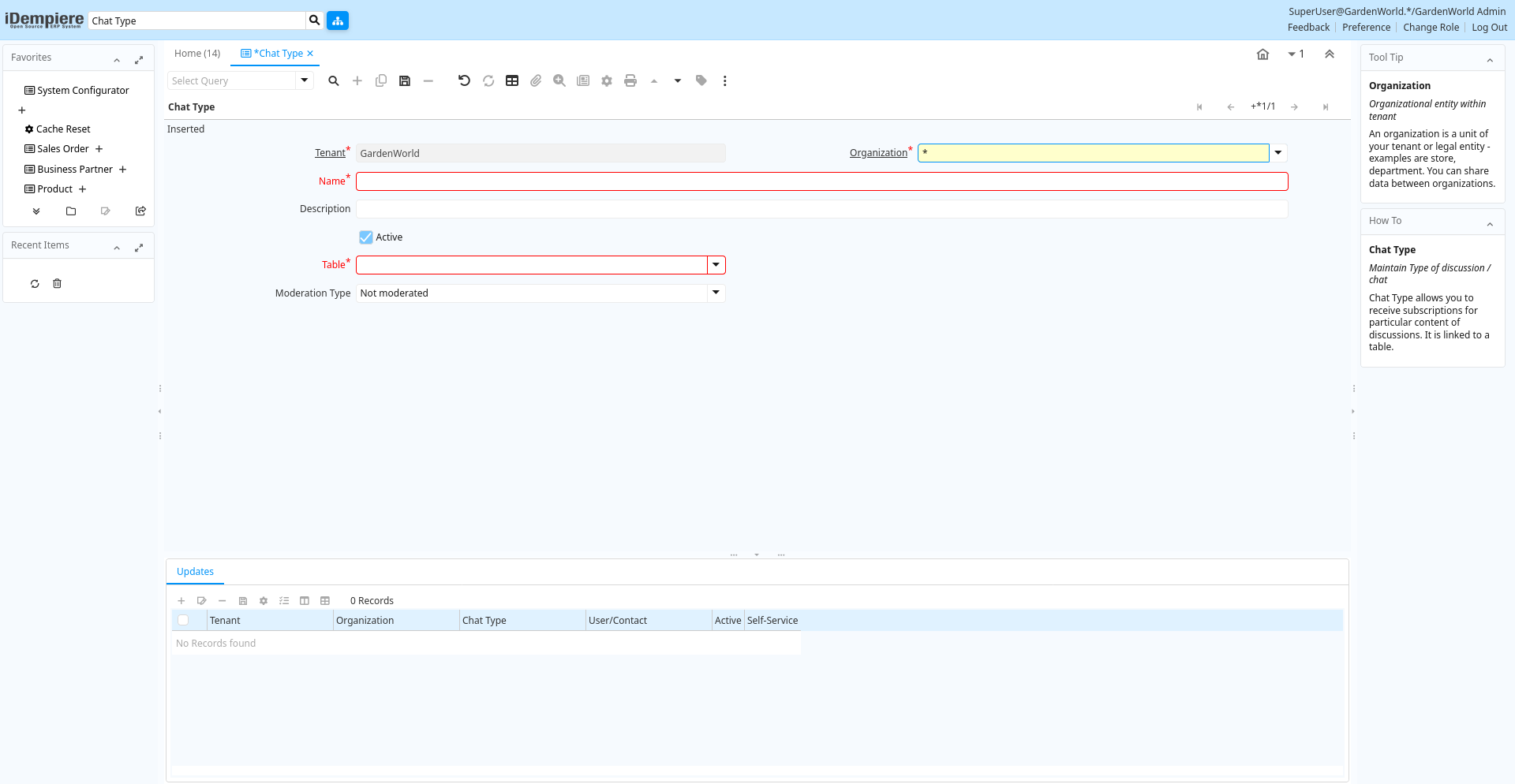
Tab: Chat Type
[Created: 18/04/2006 - Updated: 18/04/2006 ]
Description: Maintain Type of discussion / chat
Help: Chat Type allows you to receive subscriptions for particular content of discussions. It is linked to a table.
Tab Level: 0
Table 10: Chat Type - Fields
Table: Report Parameters
| Name | Description | Help | Technical Info |
|---|---|---|---|
| Tenant | Tenant for this installation. | A Tenant is a company or a legal entity. You cannot share data between Tenants. | cm_chattype.AD_Client_ID numeric(10) Table Direct |
| Organization | Organizational entity within tenant | An organization is a unit of your tenant or legal entity - examples are store, department. You can share data between organizations. | cm_chattype.AD_Org_ID numeric(10) Table Direct |
| Name | Alphanumeric identifier of the entity | The name of an entity (record) is used as an default search option in addition to the search key. The name is up to 60 characters in length. | cm_chattype.Name character varying(60) String |
| Description | Optional short description of the record | A description is limited to 255 characters. | cm_chattype.Description character varying(255) String |
| Active | The record is active in the system | There are two methods of making records unavailable in the system: One is to delete the record, the other is to de-activate the record. A de-activated record is not available for selection, but available for reports.There are two reasons for de-activating and not deleting records:(1) The system requires the record for audit purposes.(2) The record is referenced by other records. E.g., you cannot delete a Business Partner, if there are invoices for this partner record existing. You de-activate the Business Partner and prevent that this record is used for future entries. | cm_chattype.IsActive character(1) Yes-No |
| Table | Database Table information | The Database Table provides the information of the table definition | cm_chattype.AD_Table_ID numeric(10) Table Direct |
| Moderation Type | Type of moderation | cm_chattype.ModerationType character(1) List |
Tab: Updates
[Created: 18/04/2006 - Updated: 18/04/2006 ]
Description: Subscribers for the Chat Type
Help: Subscribers receive updates per email or notice
Tab Level: 1
Table 20: Updates - Fields
Table: Report Parameters
| Name | Description | Help | Technical Info |
|---|---|---|---|
| Tenant | Tenant for this installation. | A Tenant is a company or a legal entity. You cannot share data between Tenants. | cm_chattypeupdate.AD_Client_ID numeric(10) Table Direct |
| Organization | Organizational entity within tenant | An organization is a unit of your tenant or legal entity - examples are store, department. You can share data between organizations. | cm_chattypeupdate.AD_Org_ID numeric(10) Table Direct |
| Chat Type | Type of discussion / chat | Chat Type allows you to receive subscriptions for particular content of discussions. It is linked to a table. | cm_chattypeupdate.CM_ChatType_ID numeric(10) Table Direct |
| User/Contact | User within the system - Internal or Business Partner Contact | The User identifies a unique user in the system. This could be an internal user or a business partner contact | cm_chattypeupdate.AD_User_ID numeric(10) Table Direct |
| Active | The record is active in the system | There are two methods of making records unavailable in the system: One is to delete the record, the other is to de-activate the record. A de-activated record is not available for selection, but available for reports.There are two reasons for de-activating and not deleting records:(1) The system requires the record for audit purposes.(2) The record is referenced by other records. E.g., you cannot delete a Business Partner, if there are invoices for this partner record existing. You de-activate the Business Partner and prevent that this record is used for future entries. | cm_chattypeupdate.IsActive character(1) Yes-No |
| Self-Service | This is a Self-Service entry or this entry can be changed via Self-Service | Self-Service allows users to enter data or update their data. The flag indicates, that this record was entered or created via Self-Service or that the user can change it via the Self-Service functionality. | cm_chattypeupdate.IsSelfService character(1) Yes-No |