Window: Financial Report
[Created: 13/05/2001 - Updated: 03/06/2021 ]
Description: Maintain Financial Reports
Help: Financial Reports are the combination of a Report Column Set and Line Set.
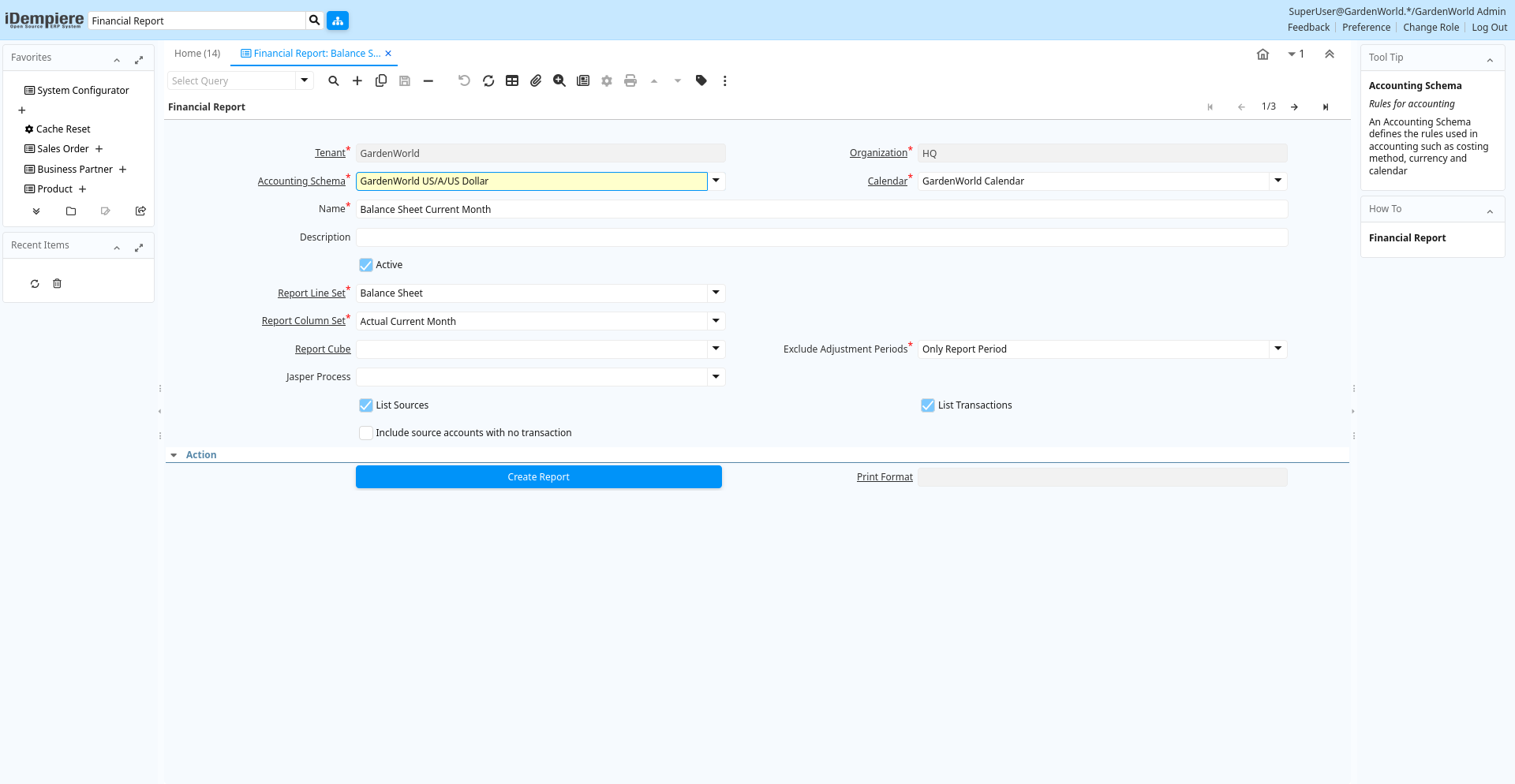
Tab: Financial Report
[Created: 13/05/2001 - Updated: 02/01/2000 ]
Description:
Help:
Tab Level: 0
Table 10: Financial Report - Fields
Table: Report Parameters
| Name | Description | Help | Technical Info |
|---|---|---|---|
| Tenant | Tenant for this installation. | A Tenant is a company or a legal entity. You cannot share data between Tenants. | pa_report.AD_Client_ID numeric(10) Table Direct |
| Organization | Organizational entity within tenant | An organization is a unit of your tenant or legal entity - examples are store, department. You can share data between organizations. | pa_report.AD_Org_ID numeric(10) Table Direct |
| Accounting Schema | Rules for accounting | An Accounting Schema defines the rules used in accounting such as costing method, currency and calendar | pa_report.C_AcctSchema_ID numeric(10) Table Direct |
| Calendar | Accounting Calendar Name | The Calendar uniquely identifies an accounting calendar. Multiple calendars can be used. For example you may need a standard calendar that runs from Jan 1 to Dec 31 and a fiscal calendar that runs from July 1 to June 30. | pa_report.C_Calendar_ID numeric(10) Table Direct |
| Name | Alphanumeric identifier of the entity | The name of an entity (record) is used as an default search option in addition to the search key. The name is up to 60 characters in length. | pa_report.Name character varying(60) String |
| Description | Optional short description of the record | A description is limited to 255 characters. | pa_report.Description character varying(255) String |
| Active | The record is active in the system | There are two methods of making records unavailable in the system: One is to delete the record, the other is to de-activate the record. A de-activated record is not available for selection, but available for reports.There are two reasons for de-activating and not deleting records:(1) The system requires the record for audit purposes.(2) The record is referenced by other records. E.g., you cannot delete a Business Partner, if there are invoices for this partner record existing. You de-activate the Business Partner and prevent that this record is used for future entries. | pa_report.IsActive character(1) Yes-No |
| Report Line Set | pa_report.PA_ReportLineSet_ID numeric(10) Table Direct | ||
| Report Column Set | Collection of Columns for Report | The Report Column Set identifies the columns used in a Report. | pa_report.PA_ReportColumnSet_ID numeric(10) Table Direct |
| Report Cube | Define reporting cube for pre-calculation of summary accounting data. | Summary data will be generated for each period of the selected calendar, grouped by the selected dimensions.. | pa_report.PA_ReportCube_ID numeric(10) Table |
| Exclude Adjustment Periods | pa_report.ExcludeAdjustmentPeriods character(1) List | ||
| Jasper Process | The Jasper Process used by the print engine if any process defined | pa_report.JasperProcess_ID numeric(10) Table | |
| List Sources | List Report Line Sources | List the Source Accounts for Summary Accounts selected | pa_report.ListSources character(1) Yes-No |
| List Transactions | List the report transactions | List the transactions of the report source lines | pa_report.ListTrx character(1) Yes-No |
| Include source accounts with no transaction | Include source accounts with no transaction for list report line sources | List the Source Accounts with or without transactions for Summary Accounts selected | pa_report.ListSourcesXTrx character(1) Yes-No |
| Create Report | Create Financial Report | The default period is the current period. You can optionally enter other restrictions. You can select an alternative Reporting Hierarchy. | pa_report.Processing character(1) Button |
| Print Format | Data Print Format | The print format determines how data is rendered for print. | pa_report.AD_PrintFormat_ID numeric(10) Table Direct |
| Create Report (Jasper) | Create Financial Report (Jasper) | The default period is the current period. You can optionally enter other restrictions. You can select an alternative Reporting Hierarchy. | pa_report.JasperProcessing character(1) Button |