Window: Business Partner Info
[Created: 27/07/2003 - Updated: 30/06/2021 ]
Description: Document Information of Business Partners
Help:
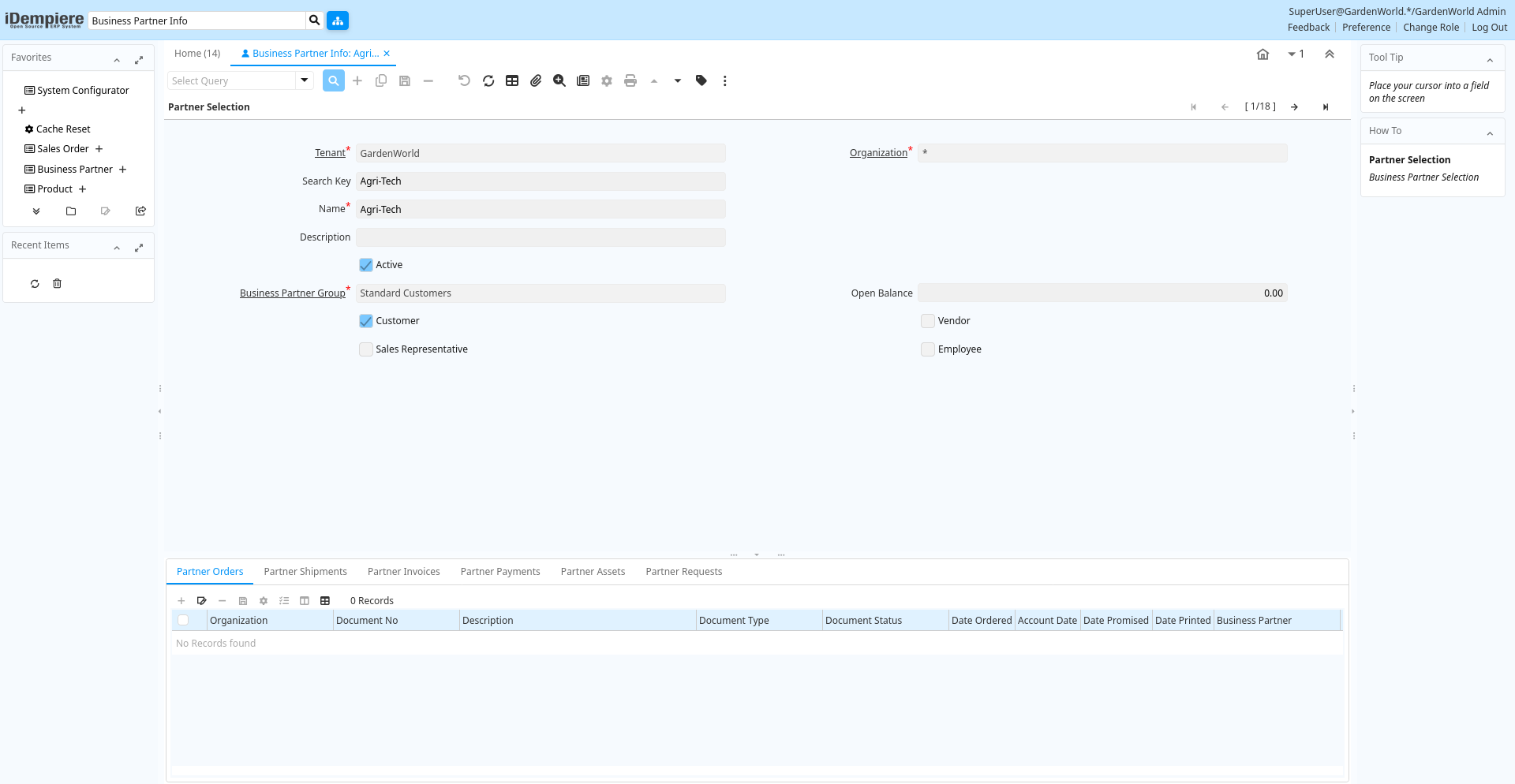
Tab: Partner Selection
[Created: 27/07/2003 - Updated: 24/07/2005 ]
Description: Business Partner Selection
Help:
Tab Level: 0
Table 10: Partner Selection - Fields
Table: Report Parameters
| Name | Description | Help | Technical Info |
|---|---|---|---|
| Tenant | Tenant for this installation. | A Tenant is a company or a legal entity. You cannot share data between Tenants. | c_bpartner.AD_Client_ID numeric(10) Table Direct |
| Organization | Organizational entity within tenant | An organization is a unit of your tenant or legal entity - examples are store, department. You can share data between organizations. | c_bpartner.AD_Org_ID numeric(10) Table Direct |
| Search Key | Search key for the record in the format required - must be unique | A search key allows you a fast method of finding a particular record.If you leave the search key empty, the system automatically creates a numeric number. The document sequence used for this fallback number is defined in the "Maintain Sequence" window with the name "DocumentNo_", where TableName is the actual name of the table (e.g. C_Order). | c_bpartner.Value character varying(40) String |
| Name | Alphanumeric identifier of the entity | The name of an entity (record) is used as an default search option in addition to the search key. The name is up to 60 characters in length. | c_bpartner.Name character varying(120) String |
| Description | Optional short description of the record | A description is limited to 255 characters. | c_bpartner.Description character varying(255) String |
| Active | The record is active in the system | There are two methods of making records unavailable in the system: One is to delete the record, the other is to de-activate the record. A de-activated record is not available for selection, but available for reports.There are two reasons for de-activating and not deleting records:(1) The system requires the record for audit purposes.(2) The record is referenced by other records. E.g., you cannot delete a Business Partner, if there are invoices for this partner record existing. You de-activate the Business Partner and prevent that this record is used for future entries. | c_bpartner.IsActive character(1) Yes-No |
| Business Partner Group | Business Partner Group | The Business Partner Group provides a method of defining defaults to be used for individual Business Partners. | c_bpartner.C_BP_Group_ID numeric(10) Table Direct |
| Open Balance | Total Open Balance Amount in primary Accounting Currency | The Total Open Balance Amount is the calculated open item amount for Customer and Vendor activity. If the Balance is below zero, we owe the Business Partner. The amount is used for Credit Management.Invoices and Payment Allocations determine the Open Balance (i.e. not Orders or Payments). | c_bpartner.TotalOpenBalance numeric Amount |
| Customer | Indicates if this Business Partner is a Customer | The Customer checkbox indicates if this Business Partner is a customer. If it is select additional fields will display which further define this customer. | c_bpartner.IsCustomer character(1) Yes-No |
| Vendor | Indicates if this Business Partner is a Vendor | The Vendor checkbox indicates if this Business Partner is a Vendor. If it is selected, additional fields will display which further identify this vendor. | c_bpartner.IsVendor character(1) Yes-No |
| Sales Representative | Indicates if the business partner is a sales representative or company agent | The Sales Rep checkbox indicates if this business partner is a sales representative. A sales representative may also be an employee, but does not need to be. | c_bpartner.IsSalesRep character(1) Yes-No |
| Employee | Indicates if this Business Partner is an employee | The Employee checkbox indicates if this Business Partner is an Employee. If it is selected, additional fields will display which further identify this employee. | c_bpartner.IsEmployee character(1) Yes-No |
Tab: Partner Orders
[Created: 27/07/2003 - Updated: 02/01/2000 ]
Description: Business Partner Orders
Help:
Tab Level: 1
Table 20: Partner Orders - Fields
Table: Report Parameters
| Name | Description | Help | Technical Info |
|---|---|---|---|
| Tenant | Tenant for this installation. | A Tenant is a company or a legal entity. You cannot share data between Tenants. | c_order.AD_Client_ID numeric(10) Table Direct |
| Organization | Organizational entity within tenant | An organization is a unit of your tenant or legal entity - examples are store, department. You can share data between organizations. | c_order.AD_Org_ID numeric(10) Table Direct |
| Document No | Document sequence number of the document | The document number is usually automatically generated by the system and determined by the document type of the document. If the document is not saved, the preliminary number is displayed in "".If the document type of your document has no automatic document sequence defined, the field is empty if you create a new document. This is for documents which usually have an external number (like vendor invoice). If you leave the field empty, the system will generate a document number for you. The document sequence used for this fallback number is defined in the "Maintain Sequence" window with the name "DocumentNo_", where TableName is the actual name of the table (e.g. C_Order). | c_order.DocumentNo character varying(30) String |
| Description | Optional short description of the record | A description is limited to 255 characters. | c_order.Description character varying(255) Text |
| Document Type | Document type or rules | The Document Type determines document sequence and processing rules | c_order.C_DocType_ID numeric(10) Table Direct |
| Document Status | The current status of the document | The Document Status indicates the status of a document at this time. If you want to change the document status, use the Document Action field | c_order.DocStatus character(2) List |
| Date Ordered | Date of Order | Indicates the Date an item was ordered. | c_order.DateOrdered timestamp without time zone Date |
| Account Date | Accounting Date | The Accounting Date indicates the date to be used on the General Ledger account entries generated from this document. It is also used for any currency conversion. | c_order.DateAcct timestamp without time zone Date |
| Date Promised | Date Order was promised | The Date Promised indicates the date, if any, that an Order was promised for. | c_order.DatePromised timestamp without time zone Date |
| Date Printed | Date the document was printed. | Indicates the Date that a document was printed. | c_order.DatePrinted timestamp without time zone Date |
| Business Partner | Identifies a Business Partner | A Business Partner is anyone with whom you transact. This can include Vendor, Customer, Employee or Salesperson | c_order.C_BPartner_ID numeric(10) Search |
| Invoice Partner | Business Partner to be invoiced | If empty the shipment business partner will be invoiced | c_order.Bill_BPartner_ID numeric(10) Search |
| Partner Location | Identifies the (ship to) address for this Business Partner | The Partner address indicates the location of a Business Partner | c_order.C_BPartner_Location_ID numeric(10) Table Direct |
| Invoice Location | Business Partner Location for invoicing | c_order.Bill_Location_ID numeric(10) Table | |
| Delivery Rule | Defines the timing of Delivery | The Delivery Rule indicates when an order should be delivered. For example should the order be delivered when the entire order is complete, when a line is complete or as the products become available. | c_order.DeliveryRule character(1) List |
| Priority | Priority of a document | The Priority indicates the importance (high, medium, low) of this document | c_order.PriorityRule character(1) List |
| Warehouse | Storage Warehouse and Service Point | The Warehouse identifies a unique Warehouse where products are stored or Services are provided. | c_order.M_Warehouse_ID numeric(10) Table Direct |
| Drop Shipment | Drop Shipments are sent directly to the Drop Shipment Location | Drop Shipments are sent directly to the Drop Shipment Location using the Drop Ship Business Partner name and contact. | c_order.IsDropShip character(1) Yes-No |
| Invoice Rule | Frequency and method of invoicing | The Invoice Rule defines how a Business Partner is invoiced and the frequency of invoicing. | c_order.InvoiceRule character(1) List |
| Sales Transaction | This is a Sales Transaction | The Sales Transaction checkbox indicates if this item is a Sales Transaction. | c_order.IsSOTrx character(1) Yes-No |
| Price List | Unique identifier of a Price List | Price Lists are used to determine the pricing, margin and cost of items purchased or sold. | c_order.M_PriceList_ID numeric(10) Table Direct |
| Currency | The Currency for this record | Indicates the Currency to be used when processing or reporting on this record | c_order.C_Currency_ID numeric(10) Table Direct |
| Sales Representative | Sales Representative or Company Agent | The Sales Representative indicates the Sales Rep for this Region. Any Sales Rep must be a valid internal user. | c_order.SalesRep_ID numeric(10) Table |
| Self-Service | This is a Self-Service entry or this entry can be changed via Self-Service | Self-Service allows users to enter data or update their data. The flag indicates, that this record was entered or created via Self-Service or that the user can change it via the Self-Service functionality. | c_order.IsSelfService character(1) Yes-No |
| Payment Rule | How you pay the invoice | The Payment Rule indicates the method of invoice payment. | c_order.PaymentRule character(1) Payment |
| Payment Term | The terms of Payment (timing, discount) | Payment Terms identify the method and timing of payment. | c_order.C_PaymentTerm_ID numeric(10) Table Direct |
| Project | Financial Project | A Project allows you to track and control internal or external activities. | c_order.C_Project_ID numeric(10) Table Direct |
| Campaign | Marketing Campaign | The Campaign defines a unique marketing program. Projects can be associated with a pre defined Marketing Campaign. You can then report based on a specific Campaign. | c_order.C_Campaign_ID numeric(10) Table Direct |
| Total Lines | Total of all document lines | The Total amount displays the total of all lines in document currency | c_order.TotalLines numeric Amount |
| Grand Total | Total amount of document | The Grand Total displays the total amount including Tax and Freight in document currency | c_order.GrandTotal numeric Amount |
| Order | Order | The Order is a control document. The Order is complete when the quantity ordered is the same as the quantity shipped and invoiced. When you close an order, unshipped (backordered) quantities are cancelled. | c_order.C_Order_ID numeric(10) ID |
Tab: Partner Shipments
[Created: 27/07/2003 - Updated: 02/01/2000 ]
Description: Business Partner Shipments
Help:
Tab Level: 1
Table 30: Partner Shipments - Fields
Table: Report Parameters
| Name | Description | Help | Technical Info |
|---|---|---|---|
| Tenant | Tenant for this installation. | A Tenant is a company or a legal entity. You cannot share data between Tenants. | m_inout.AD_Client_ID numeric(10) Table Direct |
| Organization | Organizational entity within tenant | An organization is a unit of your tenant or legal entity - examples are store, department. You can share data between organizations. | m_inout.AD_Org_ID numeric(10) Table Direct |
| Document Type | Document type or rules | The Document Type determines document sequence and processing rules | m_inout.C_DocType_ID numeric(10) Table |
| Document No | Document sequence number of the document | The document number is usually automatically generated by the system and determined by the document type of the document. If the document is not saved, the preliminary number is displayed in "".If the document type of your document has no automatic document sequence defined, the field is empty if you create a new document. This is for documents which usually have an external number (like vendor invoice). If you leave the field empty, the system will generate a document number for you. The document sequence used for this fallback number is defined in the "Maintain Sequence" window with the name "DocumentNo_", where TableName is the actual name of the table (e.g. C_Order). | m_inout.DocumentNo character varying(30) String |
| Document Status | The current status of the document | The Document Status indicates the status of a document at this time. If you want to change the document status, use the Document Action field | m_inout.DocStatus character(2) List |
| Movement Type | Method of moving the inventory | The Movement Type indicates the type of movement (in, out, to production, etc) | m_inout.MovementType character(2) List |
| Movement Date | Date a product was moved in or out of inventory | The Movement Date indicates the date that a product moved in or out of inventory. This is the result of a shipment, receipt or inventory movement. | m_inout.MovementDate timestamp without time zone Date |
| Sales Representative | Sales Representative or Company Agent | The Sales Representative indicates the Sales Rep for this Region. Any Sales Rep must be a valid internal user. | m_inout.SalesRep_ID numeric(10) Table |
| Description | Optional short description of the record | A description is limited to 255 characters. | m_inout.Description character varying(255) Text |
| Warehouse | Storage Warehouse and Service Point | The Warehouse identifies a unique Warehouse where products are stored or Services are provided. | m_inout.M_Warehouse_ID numeric(10) Table Direct |
| In Dispute | Document is in dispute | The document is in dispute. Use Requests to track details. | m_inout.IsInDispute character(1) Yes-No |
| Order | Order | The Order is a control document. The Order is complete when the quantity ordered is the same as the quantity shipped and invoiced. When you close an order, unshipped (backordered) quantities are cancelled. | m_inout.C_Order_ID numeric(10) Search |
| Shipment/Receipt | Material Shipment Document | The Material Shipment / Receipt | m_inout.M_InOut_ID numeric(10) ID |
Tab: Partner Invoices
[Created: 27/07/2003 - Updated: 02/01/2000 ]
Description: Business Partner Invoices
Help:
Tab Level: 1
Table 40: Partner Invoices - Fields
Table: Report Parameters
| Name | Description | Help | Technical Info |
|---|---|---|---|
| Tenant | Tenant for this installation. | A Tenant is a company or a legal entity. You cannot share data between Tenants. | c_invoice.AD_Client_ID numeric(10) Table Direct |
| Organization | Organizational entity within tenant | An organization is a unit of your tenant or legal entity - examples are store, department. You can share data between organizations. | c_invoice.AD_Org_ID numeric(10) Table Direct |
| Document Type | Document type or rules | The Document Type determines document sequence and processing rules | c_invoice.C_DocType_ID numeric(10) Table Direct |
| Document No | Document sequence number of the document | The document number is usually automatically generated by the system and determined by the document type of the document. If the document is not saved, the preliminary number is displayed in "".If the document type of your document has no automatic document sequence defined, the field is empty if you create a new document. This is for documents which usually have an external number (like vendor invoice). If you leave the field empty, the system will generate a document number for you. The document sequence used for this fallback number is defined in the "Maintain Sequence" window with the name "DocumentNo_", where TableName is the actual name of the table (e.g. C_Order). | c_invoice.DocumentNo character varying(30) String |
| Document Status | The current status of the document | The Document Status indicates the status of a document at this time. If you want to change the document status, use the Document Action field | c_invoice.DocStatus character(2) List |
| Self-Service | This is a Self-Service entry or this entry can be changed via Self-Service | Self-Service allows users to enter data or update their data. The flag indicates, that this record was entered or created via Self-Service or that the user can change it via the Self-Service functionality. | c_invoice.IsSelfService character(1) Yes-No |
| Date Invoiced | Date printed on Invoice | The Date Invoice indicates the date printed on the invoice. | c_invoice.DateInvoiced timestamp without time zone Date |
| Sales Representative | Sales Representative or Company Agent | The Sales Representative indicates the Sales Rep for this Region. Any Sales Rep must be a valid internal user. | c_invoice.SalesRep_ID numeric(10) Search |
| Description | Optional short description of the record | A description is limited to 255 characters. | c_invoice.Description character varying(255) Text |
| Paid | The document is fully paid | c_invoice.IsPaid character(1) Yes-No | |
| In Dispute | Document is in dispute | The document is in dispute. Use Requests to track details. | c_invoice.IsInDispute character(1) Yes-No |
| Currency | The Currency for this record | Indicates the Currency to be used when processing or reporting on this record | c_invoice.C_Currency_ID numeric(10) Table Direct |
| Grand Total | Total amount of document | The Grand Total displays the total amount including Tax and Freight in document currency | c_invoice.GrandTotal numeric Amount |
| Order | Order | The Order is a control document. The Order is complete when the quantity ordered is the same as the quantity shipped and invoiced. When you close an order, unshipped (backordered) quantities are cancelled. | c_invoice.C_Order_ID numeric(10) Search |
| Invoice | Invoice Identifier | The Invoice Document. | c_invoice.C_Invoice_ID numeric(10) ID |
Tab: Partner Payments
[Created: 27/07/2003 - Updated: 02/01/2000 ]
Description: Business Partner Payments
Help:
Tab Level: 1
Table 50: Partner Payments - Fields
Table: Report Parameters
| Name | Description | Help | Technical Info |
|---|---|---|---|
| Prepayment | The Payment/Receipt is a Prepayment | Payments not allocated to an invoice with a charge are posted to Unallocated Payments. When setting this flag, the payment is posted to the Customer or Vendor Prepayment account. | c_payment.IsPrepayment character(1) Yes-No |
| Tenant | Tenant for this installation. | A Tenant is a company or a legal entity. You cannot share data between Tenants. | c_payment.AD_Client_ID numeric(10) Table Direct |
| Organization | Organizational entity within tenant | An organization is a unit of your tenant or legal entity - examples are store, department. You can share data between organizations. | c_payment.AD_Org_ID numeric(10) Table Direct |
| Document Type | Document type or rules | The Document Type determines document sequence and processing rules | c_payment.C_DocType_ID numeric(10) Table Direct |
| Document No | Document sequence number of the document | The document number is usually automatically generated by the system and determined by the document type of the document. If the document is not saved, the preliminary number is displayed in "".If the document type of your document has no automatic document sequence defined, the field is empty if you create a new document. This is for documents which usually have an external number (like vendor invoice). If you leave the field empty, the system will generate a document number for you. The document sequence used for this fallback number is defined in the "Maintain Sequence" window with the name "DocumentNo_", where TableName is the actual name of the table (e.g. C_Order). | c_payment.DocumentNo character varying(30) String |
| Document Status | The current status of the document | The Document Status indicates the status of a document at this time. If you want to change the document status, use the Document Action field | c_payment.DocStatus character(2) List |
| Self-Service | This is a Self-Service entry or this entry can be changed via Self-Service | Self-Service allows users to enter data or update their data. The flag indicates, that this record was entered or created via Self-Service or that the user can change it via the Self-Service functionality. | c_payment.IsSelfService character(1) Yes-No |
| Transaction Date | Transaction Date | The Transaction Date indicates the date of the transaction. | c_payment.DateTrx timestamp without time zone Date |
| Bank Account | Account at the Bank | The Bank Account identifies an account at this Bank. | c_payment.C_BankAccount_ID numeric(10) Table Direct |
| Online Access | Can be accessed online | The Online Access check box indicates if the application can be accessed via the web. | c_payment.IsOnline character(1) Yes-No |
| Currency | The Currency for this record | Indicates the Currency to be used when processing or reporting on this record | c_payment.C_Currency_ID numeric(10) Table Direct |
| Payment amount | Amount being paid | Indicates the amount this payment is for. The payment amount can be for single or multiple invoices or a partial payment for an invoice. | c_payment.PayAmt numeric Amount |
| Discount Amount | Calculated amount of discount | The Discount Amount indicates the discount amount for a document or line. | c_payment.DiscountAmt numeric Amount |
| Write-off Amount | Amount to write-off | The Write Off Amount indicates the amount to be written off as uncollectible. | c_payment.WriteOffAmt numeric Amount |
| Delayed Capture | Charge after Shipment | Delayed Capture is required, if you ship products. The first credit card transaction is the Authorization, the second is the actual transaction after the shipment of the product. | c_payment.IsDelayedCapture character(1) Yes-No |
| Invoice | Invoice Identifier | The Invoice Document. | c_payment.C_Invoice_ID numeric(10) Search |
| Payment | Payment identifier | The Payment is a unique identifier of this payment. | c_payment.C_Payment_ID numeric(10) ID |
Tab: Partner Assets
[Created: 27/07/2003 - Updated: 02/01/2000 ]
Description: Business Partner Assets
Help:
Tab Level: 1
Table 60: Partner Assets - Fields
Table: Report Parameters
| Name | Description | Help | Technical Info |
|---|---|---|---|
| Tenant | Tenant for this installation. | A Tenant is a company or a legal entity. You cannot share data between Tenants. | a_asset.AD_Client_ID numeric(10) Table Direct |
| Organization | Organizational entity within tenant | An organization is a unit of your tenant or legal entity - examples are store, department. You can share data between organizations. | a_asset.AD_Org_ID numeric(10) Table Direct |
| Search Key | Search key for the record in the format required - must be unique | A search key allows you a fast method of finding a particular record.If you leave the search key empty, the system automatically creates a numeric number. The document sequence used for this fallback number is defined in the "Maintain Sequence" window with the name "DocumentNo_", where TableName is the actual name of the table (e.g. C_Order). | a_asset.Value character varying(40) String |
| Asset Group | Group of Assets | The group of assets determines default accounts. If an asset group is selected in the product category, assets are created when delivering the asset. | a_asset.A_Asset_Group_ID numeric(10) Search |
| Name | Alphanumeric identifier of the entity | The name of an entity (record) is used as an default search option in addition to the search key. The name is up to 60 characters in length. | a_asset.Name character varying(60) String |
| Description | Optional short description of the record | A description is limited to 255 characters. | a_asset.Description character varying(255) String |
| Product | Product, Service, Item | Identifies an item which is either purchased or sold in this organization. | a_asset.M_Product_ID numeric(10) Search |
| Attribute Set Instance | Product Attribute Set Instance | The values of the actual Product Attribute Instances. The product level attributes are defined on Product level. | a_asset.M_AttributeSetInstance_ID numeric(10) Product Attribute |
| Lot No | Lot number (alphanumeric) | The Lot Number indicates the specific lot that a product was part of. | a_asset.Lot character varying(255) String |
| Serial No | Product Serial Number | The Serial Number identifies a tracked, warranted product. It can only be used when the quantity is 1. | a_asset.SerNo character varying(255) String |
| Quantity | Quantity | The Quantity indicates the number of a specific product or item for this document. | a_asset.Qty numeric Quantity |
| In Service Date | Date when Asset was put into service | The date when the asset was put into service - usually used as start date for depreciation. | a_asset.AssetServiceDate timestamp without time zone Date |
| Guarantee Date | Date when guarantee expires | Date when the normal guarantee or availability expires | a_asset.GuaranteeDate timestamp without time zone Date |
Tab: Partner Requests
[Created: 27/07/2003 - Updated: 02/01/2000 ]
Description: Business Partner Requests
Help:
Tab Level: 1
Table 70: Partner Requests - Fields
Table: Report Parameters
| Name | Description | Help | Technical Info |
|---|---|---|---|
| Tenant | Tenant for this installation. | A Tenant is a company or a legal entity. You cannot share data between Tenants. | r_request.AD_Client_ID numeric(10) Table Direct |
| Organization | Organizational entity within tenant | An organization is a unit of your tenant or legal entity - examples are store, department. You can share data between organizations. | r_request.AD_Org_ID numeric(10) Table Direct |
| Request Type | Type of request (e.g. Inquiry, Complaint, ..) | Request Types are used for processing and categorizing requests. Options are Account Inquiry, Warranty Issue, etc. | r_request.R_RequestType_ID numeric(10) Table Direct |
| Document No | Document sequence number of the document | The document number is usually automatically generated by the system and determined by the document type of the document. If the document is not saved, the preliminary number is displayed in "".If the document type of your document has no automatic document sequence defined, the field is empty if you create a new document. This is for documents which usually have an external number (like vendor invoice). If you leave the field empty, the system will generate a document number for you. The document sequence used for this fallback number is defined in the "Maintain Sequence" window with the name "DocumentNo_", where TableName is the actual name of the table (e.g. C_Order). | r_request.DocumentNo character varying(30) String |
| Group | Request Group | Group of requests (e.g. version numbers, responsibility, ...) | r_request.R_Group_ID numeric(10) Table Direct |
| Category | Request Category | Category or Topic of the Request | r_request.R_Category_ID numeric(10) Table Direct |
| Status | Request Status | Status if the request (open, closed, investigating, ..) | r_request.R_Status_ID numeric(10) Table Direct |
| Resolution | Request Resolution | Resolution status (e.g. Fixed, Rejected, ..) | r_request.R_Resolution_ID numeric(10) Table Direct |
| Priority | Indicates if this request is of a high, medium or low priority. | The Priority indicates the importance of this request. | r_request.Priority character(1) List |
| User Importance | Priority of the issue for the User | r_request.PriorityUser character(1) List | |
| Sales Representative | Sales Representative or Company Agent | The Sales Representative indicates the Sales Rep for this Region. Any Sales Rep must be a valid internal user. | r_request.SalesRep_ID numeric(10) Table |
| Summary | Textual summary of this request | The Summary allows free form text entry of a recap of this request. | r_request.Summary character varying(2000) Text |
| Date Last Action | Date this request was last acted on | The Date Last Action indicates that last time that the request was acted on. | r_request.DateLastAction timestamp without time zone Date+Time |
| Last Result | Result of last contact | The Last Result identifies the result of the last contact made. | r_request.LastResult character varying(2000) String |
| Due type | Status of the next action for this Request | The Due Type indicates if this request is Due, Overdue or Scheduled. | r_request.DueType character(1) List |
| Date Next Action | Date that this request should be acted on | The Date Next Action indicates the next scheduled date for an action to occur for this request. | r_request.DateNextAction timestamp without time zone Date+Time |