Window: Shipper Configuration
[Created: 13/12/2012 - Updated: 13/12/2012 ]
Description:
Help:
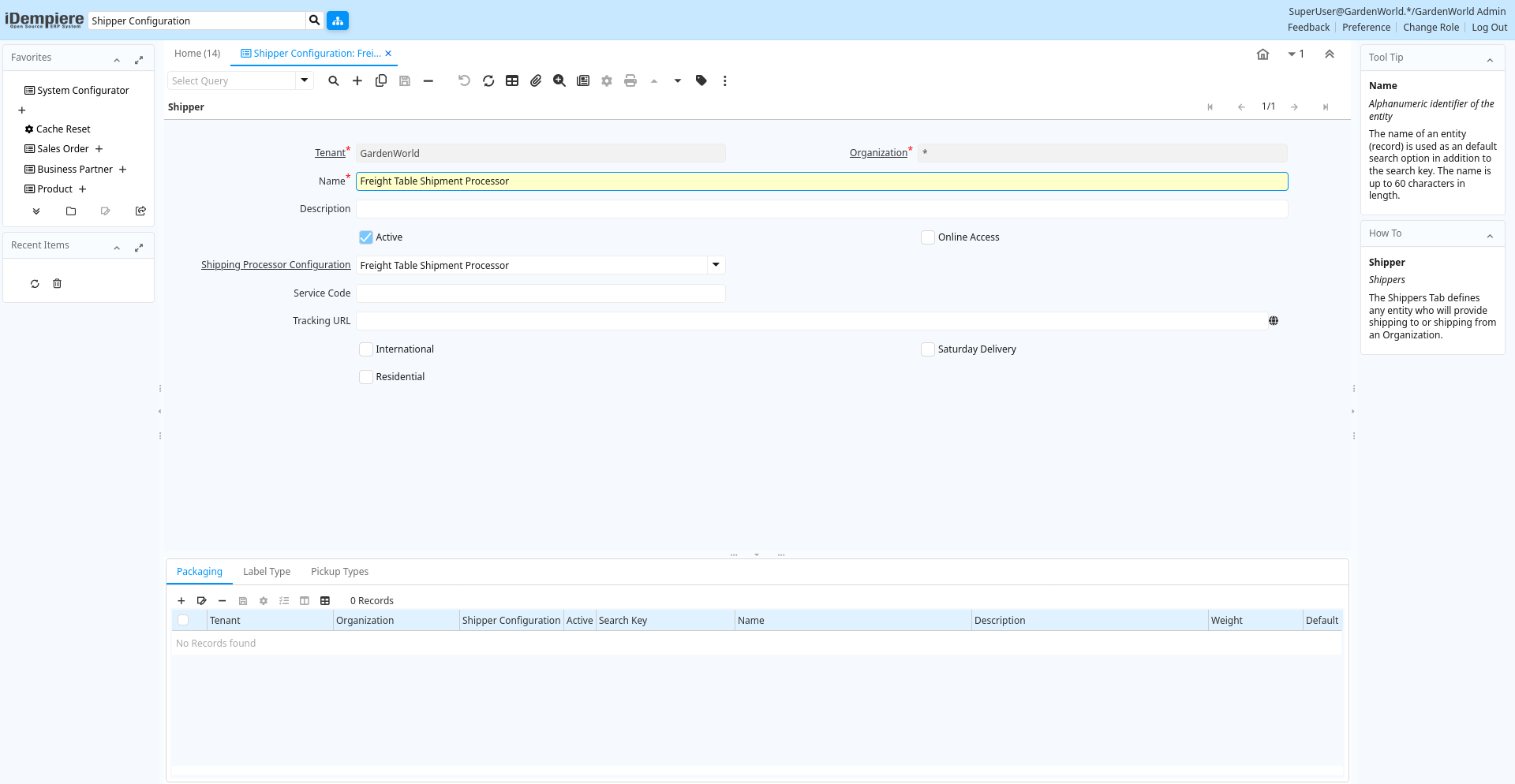
Tab: Shipper
[Created: 13/12/2012 - Updated: 13/12/2012 ]
Description: Shippers
Help: The Shippers Tab defines any entity who will provide shipping to or shipping from an Organization.
Tab Level: 0
Table 10: Shipper - Fields
Table: Report Parameters
| Name | Description | Help | Technical Info |
|---|---|---|---|
| Tenant | Tenant for this installation. | A Tenant is a company or a legal entity. You cannot share data between Tenants. | m_shippercfg.AD_Client_ID numeric(10) Table Direct |
| Organization | Organizational entity within tenant | An organization is a unit of your tenant or legal entity - examples are store, department. You can share data between organizations. | m_shippercfg.AD_Org_ID numeric(10) Table Direct |
| Name | Alphanumeric identifier of the entity | The name of an entity (record) is used as an default search option in addition to the search key. The name is up to 60 characters in length. | m_shippercfg.Name character varying(60) String |
| Description | Optional short description of the record | A description is limited to 255 characters. | m_shippercfg.Description character varying(255) String |
| Active | The record is active in the system | There are two methods of making records unavailable in the system: One is to delete the record, the other is to de-activate the record. A de-activated record is not available for selection, but available for reports.There are two reasons for de-activating and not deleting records:(1) The system requires the record for audit purposes.(2) The record is referenced by other records. E.g., you cannot delete a Business Partner, if there are invoices for this partner record existing. You de-activate the Business Partner and prevent that this record is used for future entries. | m_shippercfg.IsActive character(1) Yes-No |
| Online Access | Can be accessed online | The Online Access check box indicates if the application can be accessed via the web. | m_shippercfg.IsOnline character(1) Yes-No |
| Shipping Processor Configuration | m_shippercfg.M_ShippingProcessorCfg_ID numeric(10) Table Direct | ||
| Service Code | m_shippercfg.ShippingServiceCode character varying(40) String | ||
| Tracking URL | URL of the shipper to track shipments | The variable @TrackingNo@ in the URL is replaced by the actual tracking number of the shipment. | m_shippercfg.TrackingURL character varying(120) URL |
| International | m_shippercfg.IsInternational character(1) Yes-No | ||
| Saturday Delivery | m_shippercfg.IsSaturdayDelivery character(1) Yes-No | ||
| Residential | m_shippercfg.IsResidential character(1) Yes-No | ||
| Shipper Copy From ... | m_shippercfg.CopyFrom character(1) Button |
Tab: Packaging
[Created: 13/12/2012 - Updated: 13/12/2012 ]
Description: Packaging Options supported by the Shipper
Help:
Tab Level: 1
Table 20: Packaging - Fields
Table: Report Parameters
| Name | Description | Help | Technical Info |
|---|---|---|---|
| Tenant | Tenant for this installation. | A Tenant is a company or a legal entity. You cannot share data between Tenants. | m_shipperpackagingcfg.AD_Client_ID numeric(10) Table Direct |
| Organization | Organizational entity within tenant | An organization is a unit of your tenant or legal entity - examples are store, department. You can share data between organizations. | m_shipperpackagingcfg.AD_Org_ID numeric(10) Table Direct |
| Shipper Configuration | m_shipperpackagingcfg.M_ShipperCfg_ID numeric(10) Table Direct | ||
| Active | The record is active in the system | There are two methods of making records unavailable in the system: One is to delete the record, the other is to de-activate the record. A de-activated record is not available for selection, but available for reports.There are two reasons for de-activating and not deleting records:(1) The system requires the record for audit purposes.(2) The record is referenced by other records. E.g., you cannot delete a Business Partner, if there are invoices for this partner record existing. You de-activate the Business Partner and prevent that this record is used for future entries. | m_shipperpackagingcfg.IsActive character(1) Yes-No |
| Search Key | Search key for the record in the format required - must be unique | A search key allows you a fast method of finding a particular record.If you leave the search key empty, the system automatically creates a numeric number. The document sequence used for this fallback number is defined in the "Maintain Sequence" window with the name "DocumentNo_", where TableName is the actual name of the table (e.g. C_Order). | m_shipperpackagingcfg.Value character varying(40) String |
| Name | Alphanumeric identifier of the entity | The name of an entity (record) is used as an default search option in addition to the search key. The name is up to 60 characters in length. | m_shipperpackagingcfg.Name character varying(60) String |
| Description | Optional short description of the record | A description is limited to 255 characters. | m_shipperpackagingcfg.Description character varying(255) String |
| Weight | Weight of a product | The Weight indicates the weight of the product in the Weight UOM of the Tenant | m_shipperpackagingcfg.Weight numeric Quantity |
| Default | Default value | The Default Checkbox indicates if this record will be used as a default value. | m_shipperpackagingcfg.IsDefault character(1) Yes-No |
Tab: Label Type
[Created: 13/12/2012 - Updated: 13/12/2012 ]
Description: Label Types Supported by the Shipper.
Help: Used when booking a shipment online to define the label format that will be printed.
Tab Level: 1
Table 30: Label Type - Fields
Table: Report Parameters
| Name | Description | Help | Technical Info |
|---|---|---|---|
| Tenant | Tenant for this installation. | A Tenant is a company or a legal entity. You cannot share data between Tenants. | m_shipperlabelscfg.AD_Client_ID numeric(10) Table Direct |
| Organization | Organizational entity within tenant | An organization is a unit of your tenant or legal entity - examples are store, department. You can share data between organizations. | m_shipperlabelscfg.AD_Org_ID numeric(10) Table Direct |
| Shipper Configuration | m_shipperlabelscfg.M_ShipperCfg_ID numeric(10) Table Direct | ||
| Active | The record is active in the system | There are two methods of making records unavailable in the system: One is to delete the record, the other is to de-activate the record. A de-activated record is not available for selection, but available for reports.There are two reasons for de-activating and not deleting records:(1) The system requires the record for audit purposes.(2) The record is referenced by other records. E.g., you cannot delete a Business Partner, if there are invoices for this partner record existing. You de-activate the Business Partner and prevent that this record is used for future entries. | m_shipperlabelscfg.IsActive character(1) Yes-No |
| Search Key | Search key for the record in the format required - must be unique | A search key allows you a fast method of finding a particular record.If you leave the search key empty, the system automatically creates a numeric number. The document sequence used for this fallback number is defined in the "Maintain Sequence" window with the name "DocumentNo_", where TableName is the actual name of the table (e.g. C_Order). | m_shipperlabelscfg.Value character varying(40) String |
| Name | Alphanumeric identifier of the entity | The name of an entity (record) is used as an default search option in addition to the search key. The name is up to 60 characters in length. | m_shipperlabelscfg.Name character varying(60) String |
| Description | Optional short description of the record | A description is limited to 255 characters. | m_shipperlabelscfg.Description character varying(255) String |
| Width | m_shipperlabelscfg.Width numeric Quantity | ||
| Height | m_shipperlabelscfg.Height numeric Quantity | ||
| Label Print Method | m_shipperlabelscfg.LabelPrintMethod character(1) List | ||
| Default | Default value | The Default Checkbox indicates if this record will be used as a default value. | m_shipperlabelscfg.IsDefault character(1) Yes-No |
Tab: Pickup Types
[Created: 13/12/2012 - Updated: 13/12/2012 ]
Description: Methods that the Shipper will support for picking up from your location
Help:
Tab Level: 1
Table 40: Pickup Types - Fields
Table: Report Parameters
| Name | Description | Help | Technical Info |
|---|---|---|---|
| Tenant | Tenant for this installation. | A Tenant is a company or a legal entity. You cannot share data between Tenants. | m_shipperpickuptypescfg.AD_Client_ID numeric(10) Table Direct |
| Organization | Organizational entity within tenant | An organization is a unit of your tenant or legal entity - examples are store, department. You can share data between organizations. | m_shipperpickuptypescfg.AD_Org_ID numeric(10) Table Direct |
| Shipper Configuration | m_shipperpickuptypescfg.M_ShipperCfg_ID numeric(10) Table Direct | ||
| Active | The record is active in the system | There are two methods of making records unavailable in the system: One is to delete the record, the other is to de-activate the record. A de-activated record is not available for selection, but available for reports.There are two reasons for de-activating and not deleting records:(1) The system requires the record for audit purposes.(2) The record is referenced by other records. E.g., you cannot delete a Business Partner, if there are invoices for this partner record existing. You de-activate the Business Partner and prevent that this record is used for future entries. | m_shipperpickuptypescfg.IsActive character(1) Yes-No |
| Search Key | Search key for the record in the format required - must be unique | A search key allows you a fast method of finding a particular record.If you leave the search key empty, the system automatically creates a numeric number. The document sequence used for this fallback number is defined in the "Maintain Sequence" window with the name "DocumentNo_", where TableName is the actual name of the table (e.g. C_Order). | m_shipperpickuptypescfg.Value character varying(40) String |
| Name | Alphanumeric identifier of the entity | The name of an entity (record) is used as an default search option in addition to the search key. The name is up to 60 characters in length. | m_shipperpickuptypescfg.Name character varying(60) String |
| Description | Optional short description of the record | A description is limited to 255 characters. | m_shipperpickuptypescfg.Description character varying(255) String |
| Default | Default value | The Default Checkbox indicates if this record will be used as a default value. | m_shipperpickuptypescfg.IsDefault character(1) Yes-No |