Window: Serial No Control
[Created: 05/05/2003 - Updated: 02/01/2000 ]
Description: Product Serial Number Control
Help: Definition to create Serial numbers for Products
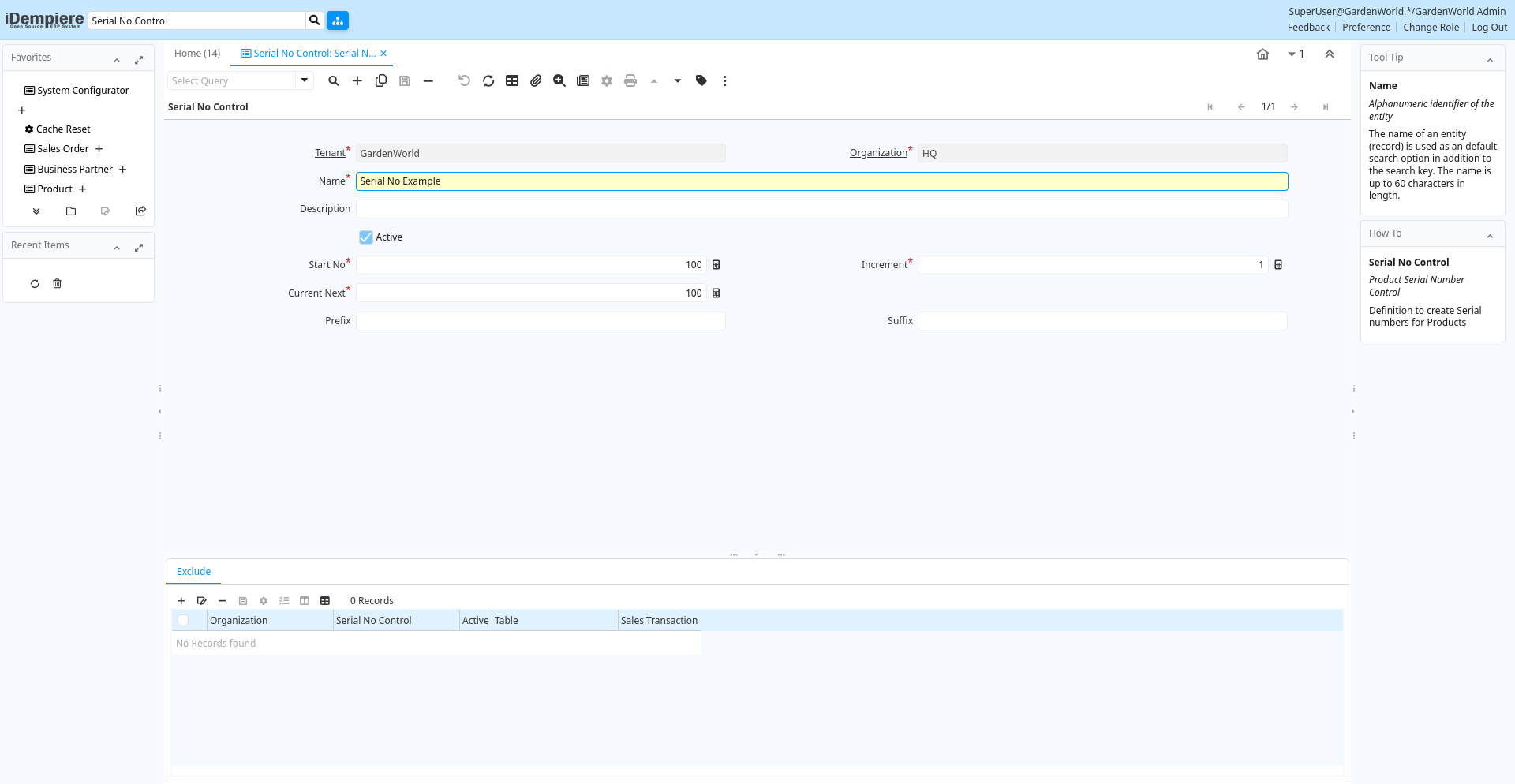
Tab: Serial No Control
[Created: 05/05/2003 - Updated: 02/01/2000 ]
Description: Product Serial Number Control
Help: Definition to create Serial numbers for Products
Tab Level: 0
Table 10: Serial No Control - Fields
Table: Report Parameters
| Name | Description | Help | Technical Info |
|---|---|---|---|
| Tenant | Tenant for this installation. | A Tenant is a company or a legal entity. You cannot share data between Tenants. | m_sernoctl.AD_Client_ID numeric(10) Table Direct |
| Organization | Organizational entity within tenant | An organization is a unit of your tenant or legal entity - examples are store, department. You can share data between organizations. | m_sernoctl.AD_Org_ID numeric(10) Table Direct |
| Name | Alphanumeric identifier of the entity | The name of an entity (record) is used as an default search option in addition to the search key. The name is up to 60 characters in length. | m_sernoctl.Name character varying(60) String |
| Description | Optional short description of the record | A description is limited to 255 characters. | m_sernoctl.Description character varying(255) String |
| Active | The record is active in the system | There are two methods of making records unavailable in the system: One is to delete the record, the other is to de-activate the record. A de-activated record is not available for selection, but available for reports.There are two reasons for de-activating and not deleting records:(1) The system requires the record for audit purposes.(2) The record is referenced by other records. E.g., you cannot delete a Business Partner, if there are invoices for this partner record existing. You de-activate the Business Partner and prevent that this record is used for future entries. | m_sernoctl.IsActive character(1) Yes-No |
| Start No | Starting number/position | The Start Number indicates the starting position in the line or field number in the line | m_sernoctl.StartNo numeric(10) Integer |
| Increment | The number to increment the last document number by | The Increment indicates the number to increment the last document number by to arrive at the next sequence number | m_sernoctl.IncrementNo numeric(10) Integer |
| Current Next | The next number to be used | The Current Next indicates the next number to use for this document | m_sernoctl.CurrentNext numeric(10) Integer |
| Prefix | Prefix before the sequence number | The Prefix indicates the characters to print in front of the document number. | m_sernoctl.Prefix character varying(10) String |
| Suffix | Suffix after the number | The Suffix indicates the characters to append to the document number. | m_sernoctl.Suffix character varying(10) String |
Tab: Exclude
[Created: 01/09/2005 - Updated: 02/09/2005 ]
Description: Exclude the ability to create Serial Numbers in Attribute Sets
Help: Create a record, if you want to exclude the ability to create Serial Numbers in Product Attribute Set information.Note that the information is cached. To have effect you may have to re-login or reset cache.
Tab Level: 1
Table 20: Exclude - Fields
Table: Report Parameters
| Name | Description | Help | Technical Info |
|---|---|---|---|
| Tenant | Tenant for this installation. | A Tenant is a company or a legal entity. You cannot share data between Tenants. | m_sernoctlexclude.AD_Client_ID numeric(10) Table Direct |
| Organization | Organizational entity within tenant | An organization is a unit of your tenant or legal entity - examples are store, department. You can share data between organizations. | m_sernoctlexclude.AD_Org_ID numeric(10) Table Direct |
| Serial No Control | Product Serial Number Control | Definition to create Serial numbers for Products | m_sernoctlexclude.M_SerNoCtl_ID numeric(10) Table Direct |
| Active | The record is active in the system | There are two methods of making records unavailable in the system: One is to delete the record, the other is to de-activate the record. A de-activated record is not available for selection, but available for reports.There are two reasons for de-activating and not deleting records:(1) The system requires the record for audit purposes.(2) The record is referenced by other records. E.g., you cannot delete a Business Partner, if there are invoices for this partner record existing. You de-activate the Business Partner and prevent that this record is used for future entries. | m_sernoctlexclude.IsActive character(1) Yes-No |
| Table | Database Table information | The Database Table provides the information of the table definition | m_sernoctlexclude.AD_Table_ID numeric(10) Table Direct |
| Sales Transaction | This is a Sales Transaction | The Sales Transaction checkbox indicates if this item is a Sales Transaction. | m_sernoctlexclude.IsSOTrx character(1) Yes-No |